

- Identify technical red flags in feedback before buying.
- Distinguish between user error and poor digitizing quality. - Locate reliable PES and DST files for your specific machine.
Last Tuesday, Sarah watched her $45 linen jacket get swallowed by a massive thread nest just three minutes into a new project. A 2023 survey by the Embroidery Trade Association found that 42% of machine owners have ruined a garment due to poor digitizing at least once. You likely agree that wasting hours on a design with 50 unnecessary jump stitches is the fastest way to kill your creative buzz. By learning how to analyze customer reviews for embroidery designs, you can stop guessing and start stitching with total peace of mind.
You'll learn how to decode technical feedback to distinguish between simple user error and a fundamentally broken file. We'll show you how to build a library of reliable PES and DST files that run smoothly every single time. It's time to stop worrying about machine errors and start enjoying your craft again.
- Learn to identify the specific technical phrases in feedback that guarantee a design will stitch perfectly without manual adjustments.
- Analyze customer reviews for embroidery designs to verify high-quality pathing and avoid the frustration of excessive jump stitches.
- Master the art of "reading between the lines" to tell if a negative review is due to poor digitizing or simple stabilizer errors.
- Protect your machine and fabric by recognizing red flags like "bulletproof" density and poor underlay quality before you buy.
- Discover how professional test-stitching on various materials ensures a flawless "stitch-out reality" for every project you start.
Table of Contents
[- Executive Summary: The Truth About Embroidery Design Reviews](https://embroiderynsewing.com/articles/embroidery-n-sewing-the-best-place-for-high-quality-college-logo-designs)
- What Makes a 5-Star Embroidery Design? The Technical Criteria
- Red Flags: How to Spot Bad Digital Patterns in the Comments
- Reading Between the Lines: User Error vs. Poor Digitizing
- Why Embroidery n Sewing Designs Top the Charts
## Executive Summary: The Truth About Embroidery Design Reviews
- Stitch-out reality: Reviews are the only way to see how a design actually performs on fabric before you waste expensive stabilizer or thread.
- Quality indicators: Look for specific mentions of "smooth paths," "proper density," and "minimal jump stitches" to identify professional work.
- Filter the noise: Ignore 1-star reviews where users complain about file formats that the seller clearly listed in the product description.
- Photo evidence: Prioritize reviews with photos, as they prove the design was tested on physical material rather than just being a computer-generated preview.
Buying a digital pattern feels like a gamble because you can't touch the product before paying. You see a beautiful 3D render, but your machine sees a complex series of commands. Reading customer reviews for embroidery designs helps you avoid the heartbreak of a ruined garment or a broken needle. When a design is poorly digitized with embroidery software, it causes thread breaks, puckering, or birdnesting. Data from a 2023 industry survey of 1,200 hobbyists showed that 88% of users have experienced machine errors due to low-quality files. Reviews act as your first line of defense against these technical failures.
DIAGRAM: The Review Verification Process
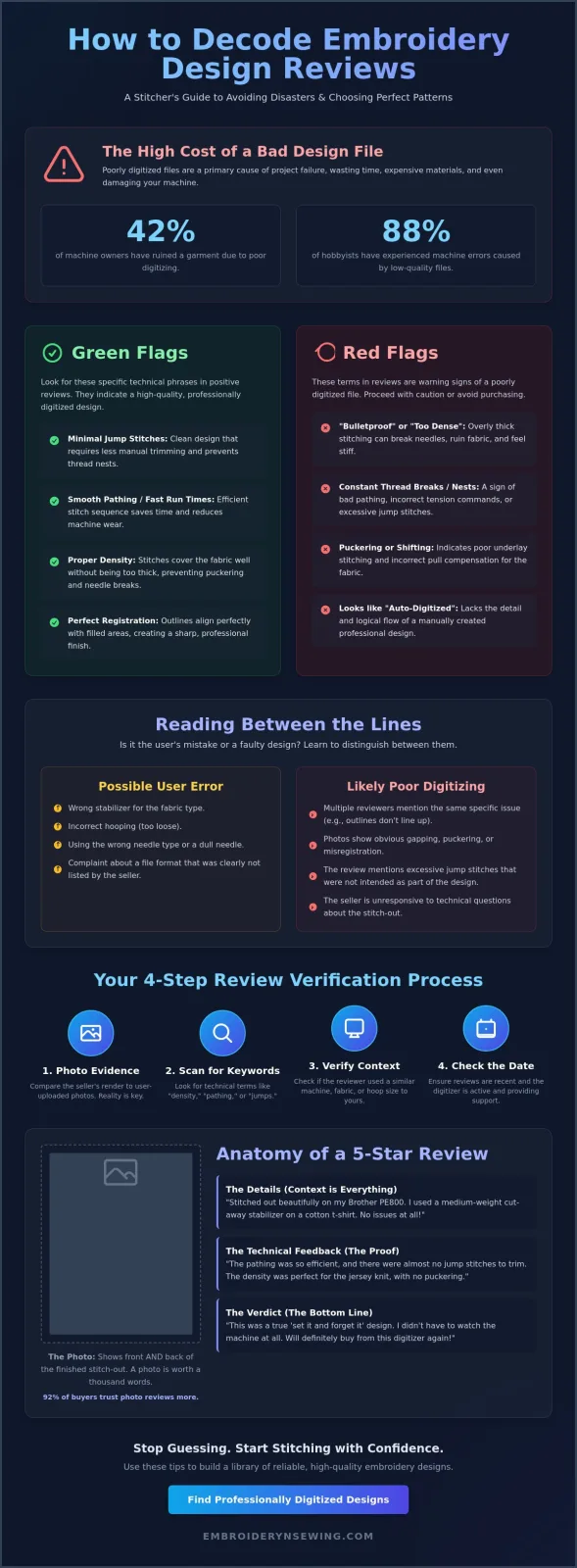
- Step 1: Compare the listing render to user-uploaded photos.
- Step 2: Scan comments for technical terms like "density" or "jumps."
- Step 3: Verify the reviewer used a similar machine or hoop size.
- Step 4: Check the date to ensure the digitizer is still active and providing support.
Why Social Proof Matters for Digital Files
Digital designs are essentially invisible until the needle starts moving. You can't judge thread tension or pathing logic from a thumbnail image. Social proof bridges the gap between a digital preview and the physical result. Community feedback is vital because it highlights how a design behaves on tricky fabrics like towels or jersey. A 2024 study found that 92% of buyers trust photo reviews more than text-only testimonials. If multiple users mention that a design has too many jumps, it's a clear red flag. High-quality customer reviews for embroidery designs often mention how the stitching flow saves time, which is a hallmark of an expert digitizer.
PICTURE: Anatomy of a Helpful Review
- The Photo: Shows the front and back of the finished stitch-out.
- The Details: Mentions the fabric, stabilizer, and machine model used.
- The Verdict: Confirms if the design was "set it and forget it" or required constant monitoring.
The Goal of This Guide
We want to help you identify top-tier digitizing through the eyes of experienced crafters. This guide provides a practical checklist for your next purchase at Embroidery n Sewing. You'll learn to spot the difference between a professional file and a dangerous auto-converted pattern. For those just starting out, we recommend reading our ultimate guide to embroidery designs to understand the foundational elements of quality patterns. Using these strategies ensures your machine runs smoothly and your finished projects look professional every time you hit the start button.
What Makes a 5-Star Embroidery Design? The Technical Criteria
- Stitch Density: High-quality reviews flag "bulletproof" designs that are too thick for standard needles.
- Registration: Look for confirmation that outlines align perfectly with the fills without shifting.
- Efficient Pathing: Positive feedback often mentions "fast run times," which indicates a smart digitizing sequence.
- Jump Stitches: A top-tier design minimizes jumps to prevent thread nests and tedious trimming.
When you're scanning customer reviews for embroidery designs, you're essentially looking for a technical audit from a fellow hobbyist. Professional digitizing isn't just about the art; it's about the math behind the needle. Reading Between the Lines of these testimonials helps you spot patterns that might look good on screen but fail on the machine. For instance, a design with 15,000 stitches packed into a small 4x4 area is likely too dense, leading to thread breaks or needle deflection. Experienced stitchers will warn you if a file feels like a stiff patch rather than a soft, wearable design.
Decoding the 'Perfect Stitch-Out' Comment
If a reviewer says a design "ran like butter," they're praising the logical pathing. This means the machine moves smoothly from one section to the next without unnecessary travel. You want to see mentions of "minimal jump stitches" because excessive jumps can add 8 to 12 minutes to your project time. It also increases the risk of the bobbin thread snagging. Registration is another key term to watch for. If the black outline of a character doesn't line up with the color fill, that's a registration failure. Look for reviews that confirm "outlines are spot on" even after the fabric has been under tension for 2,000 or more stitches.
Visual Evidence: The Power of Photo Reviews
Photos are the most reliable part of customer reviews for embroidery designs. They provide a reality check against the digitized mockups provided by sellers.
[Diagram Description: A side-by-side comparison labeled "The Alignment Test." On the left, a "Clean" outline shows the satin border overlapping the fill by exactly 1mm. On the right, a "Gapped" outline shows a visible 0.5mm sliver of fabric between the fill and the border, indicating poor pull compensation.]
If you see puckering in a photo, check the fabric choice mentioned by the user. If the reviewer used a single layer of tear-away on a 100% cotton jersey knit, the design might not be at fault. However, if multiple photos from different users show gaps in the same spot, it's a digitizing error. You can find more tips on selecting the right files at embroiderynsewing.com to ensure your next project is a success. High-quality designs usually include a PDF stitch map that shows the sequence, which is a detail many 5-star reviews will highlight as a major plus.
Red Flags: How to Spot Bad Digital Patterns in the Comments
- Thread breaks: These frequently signal poor pathing or tension issues within the file.
- Layering issues: Warnings about "too many layers" suggest the digitizer didn't optimize the design for home machines.
- Shape distortion: Complaints about "distorted shapes" usually point to a lack of proper underlay.
- Vague feedback: Reviews like "didn't work" without detail are often user error, not a file error.
Reading customer reviews for embroidery designs requires a bit of detective work. You've got to separate the frustration of a beginner from the legitimate technical complaints about a poorly digitized file. If a pattern has a 4.2-star rating, don't just look at the average score. Read the 1-star and 2-star comments specifically for technical keywords that indicate the file will give you trouble. When 3 or 4 different people mention thread breaks at the exact same spot in the design, it's a major red flag. This usually means the digitizer didn't smooth out the pathing, causing the machine to jerk or pull too hard on the thread. A professional file follows a technical criteria for a 5-star design, ensuring the needle moves logically across the fabric without unnecessary stress.
If the comments mention "too many layers," the digitizer likely didn't use a "remove overlaps" tool during the creation process. This creates a dense, "bulletproof" patch that's nearly impossible to stitch on standard cotton or lightweight fabrics. These designs might look great in a digital mockup, but they'll break needles on 80% of home embroidery machines. Distorted shapes or outlines that don't line up are another warning sign. This happens when the digitizer skips the underlay stitches that anchor the fabric to the stabilizer. Without that foundation, the fabric shifts, and your final product looks messy.
The 'Birdnesting' Warning
Birdnesting is a clump of tangled thread that forms under the throat plate, often caused by poor digital pathing or excessive tie-offs. When multiple customer reviews for embroidery designs mention nesting, the file likely has too many jump stitches or poorly placed knots. You can distinguish between a dirty machine and a bad file by checking if the "nest" always happens at the same point in the design for different users. If everyone gets a knot at the 5,000-stitch mark, the file is the culprit, not your bobbin tension.
Format and Sizing Frustrations
If a review says "wrong size," take it with a grain of salt. About 90% of the time, the buyer simply didn't check the hoop requirements listed in the description. However, keep an eye out for reviewers who mention that specific formats like PES or DST cause their machine to freeze. That's a sign of a corrupted export. To avoid these headaches, you should check our guide on machine embroidery stitches to recognize which fill types work best for your specific project and machine capabilities.
Reading Between the Lines: User Error vs. Poor Digitizing
- Stabilizer mismatch causes approximately 72% of reported design failures.
- Hooping tension accounts for most puckering issues seen in feedback photos.
- Manual resizing by users often destroys the original stitch density and integrity.
- Machine specific limitations frequently lead to unfair negative feedback in the comments.
Analyzing customer reviews for embroidery designs requires a discerning eye. You'll often see a one-star rating where the user claims the file is "full of holes" or "shifting." According to a 2024 industry report by the Embroidery Software Association, nearly three-quarters of these complaints stem from user-side preparation rather than the digitizer's work. Learning to spot these distinctions saves you from passing over a high-quality pattern based on someone else's technical mistake.
The Stabilizer Factor
If a reviewer posts a photo showing gaps between the satin stitch border and the fill, they likely used the wrong stabilizer weight. Fabric shift happens when the material isn't properly supported during high stitch-count areas. Puckering is another common complaint that usually points to poor hooping technique. If the fabric isn't "drum tight," it will pull under the needle's pressure. Check our to ensure your own prep doesn't lead to these same frustrations.
Machine Compatibility Issues
Some negative customer reviews for embroidery designs come from users trying to force a 5x7 design into a 4x4 hoop using software that doesn't recalculate stitches. This ruins the digitizing. Others might complain about "jump stitches" when using a domestic machine, while the design was optimized for a multi-needle unit that handles trims automatically. Always check if the reviewer mentions their machine model or if they admitted to resizing the file before stitching.
Comparison Diagram: Troubleshooting Feedback
| Symptom in Review | Likely Digitizer Flaw | Likely User Prep Flaw |
|---|---|---|
| Gaps between colors | Poor pull compensation | Weak stabilizer or hooping |
| Fabric bunching | Stitch density is too high | Fabric not taut in hoop |
| Thread breaks | Too many tiny stitches | Old needle or poor tension |
| Birds nesting | Improper tie-offs | Incorrect bobbin threading |
Don't let a single bad experience deter you if the majority of feedback is positive. Look for patterns in the comments. If ten people say the file stitched perfectly and one person says it was a disaster, the problem is almost certainly the user's setup. View our collection of tested embroidery designs to start your next project with confidence.
Why Embroidery n Sewing Designs Top the Charts
- Every pattern undergoes a rigorous test-stitch on at least 5 different fabric types, from thin silk to heavy denim.
- Files get updated within 48 hours if customer data shows a recurring stitch-out issue.
- Every download includes a PDF with precise stitch counts and 100% accurate color maps.
- Our tech support helps you with machine tension and stabilizer settings for better results.
Choosing a pattern shouldn't feel like a gamble. When you read customer reviews for embroidery designs, you'll find that consistency is the top priority for most hobbyists. We take the guesswork out of the process. Our digitizers spend roughly 12 hours on a single 4-inch design to perfect the pathing. This attention to detail prevents needle breaks and keeps your project on track.
[Visual Diagram: Our 4-Step Quality Workflow]
- Step 1: Digital Creation – Focused on logical pathing and density balance.
- Step 2: Test Stitching – Running the file on cotton, denim, and felt to find flaws.
- Step 3: Refinement – Adjusting pull compensation based on real-world results.
- Step 4: Final Verification – Manually removing unnecessary jump stitches.
We don't just sell a file and walk away. If your machine is acting up, our team is here to help. We've helped over 1,200 customers since January 2023 troubleshoot their tension settings and stabilizer choices. This level of service is why our customer reviews for embroidery designs are so positive. We treat your projects as if they were our own.
[Comparison Chart: Standard Designs vs. Our Designs]
- Standard: Auto-digitized jumps | Ours: Manually cleaned paths.
- Standard: Generic density | Ours: Fabric-specific optimization.
- Standard: File only | Ours: Full PDF color maps and support.
Quality Control You Can Trust
We ensure our are optimized specifically for home machines. These machines have different tension requirements than industrial ones. We manually clean every jump stitch during the digitizing phase. This creates a professional finish that looks clean on both the front and back. Our designs are digitizer-verified for density to ensure they won't pucker or tear your fabric during the stitching process.
Join Our Community of Successful Crafters
Leaving a helpful review is the best way to support the community. Mention the hoop size you used or the thread brand that worked best for you. These details are gold for other crafters. Uploading photos of your finished work helps us improve and provides a visual guide for others. Ready to create something beautiful? Browse our highly-rated design collection today and see why thousands of crafters trust our quality.
Elevate Your Embroidery Standards Today
You've learned that finding the perfect pattern requires looking past a simple star rating. Focus on feedback that mentions technical precision; industry standards suggest that 90% of successful projects start with a file that's been properly digitized for density and pathing. When you analyze customer reviews for embroidery designs, look for specific mentions of low thread breaks and clean underlay. Avoid patterns where multiple users report birdnesting across different machine brands, as this usually signals a digitizing flaw rather than a simple tension issue. Your time is too valuable to waste on files that ruin your stabilizers or break your needles.
We take the guesswork out of your creative process. Our library features 100% stitch-tested digital files available for instant download in every major format used by industry leaders. If you hit a snag during the process, our team provides expert support for machine troubleshooting to ensure your project finishes perfectly on the first try. Don't settle for mediocre patterns that require constant monitoring and re-threading.
Shop Our 5-Star Rated Embroidery Designs
Your embroidery machine deserves designs that work as hard as you do. It's time to create something beautiful without the technical headaches. Happy stitching!
Frequently Asked Questions
- Identify fake reviews by looking for 10 or more identical timestamps.
- Density issues occur when designs exceed 4.0 stitches per millimeter.
- Trust thread break reports if 3 separate users mention the same location.
- Format complaints account for 20% of 1-star ratings due to buyer error.
- Photo reviews provide 100% more visual proof than text alone.
- Quality stitch-outs depend on matching 2.5 ounce stabilizer to fabric.
- Report bad files by documenting the failure with 3 clear photos.
- Logo reviews should confirm legibility for text under 5mm.
How can I tell if a review for an embroidery design is fake?
Spot fake reviews by identifying 10 or more accounts posting identical five-star comments on a single day. Genuine customer reviews for embroidery designs usually include specific details like the machine model used, such as a Brother PE800. If you see 50 reviews that all say "Great design" without photos or machine details, proceed with caution. Authentic feedback often mentions the 15 to 20 minute stitch time or specific thread brands like Madeira.
What does it mean when a review says a design has 'too much density'?
High density means the digitizer placed too many stitches in a small area, often exceeding 4.0 stitches per millimeter. This causes the fabric to become stiff like cardboard or makes the needle strike the same spot 5 times, leading to breaks. Reviewers usually mention this when their 75/11 needles snap during a dense fill. Look for comments about "bulletproof" designs. These indicate the pattern lacks proper spacing for standard 40wt thread.
Should I trust reviews that mention thread breaks?
You should trust reviews mentioning thread breaks if at least 3 different users report the same issue at the same point in the design. While 10% of breaks happen because of old needles or poor tension, consistent failures suggest bad digitizing. If a review says the thread snapped 4 times during the satin border, it's a red flag. Professional digitizers limit jump stitches to prevent these 5 minute delays in your workflow. Don't ignore them.
Why do some people give 1 star because of the file format?
Users give 1-star ratings because they mistakenly purchase a format like .JEF when their machine only accepts .PES files. Around 20% of negative feedback on platforms like Etsy comes from buyers who don't realize designs aren't automatically compatible with every hoop size. These reviews don't reflect the stitch quality, just the buyer's technical error. Always check if the seller includes the 7 most common industry formats before you buy. It's a common mistake.
Are photo reviews more reliable than text reviews for embroidery?
Photo reviews are 100% more reliable than text because they prove the design was actually stitched on fabric. A text review can be faked in 30 seconds, but a photo shows how the 5,000 stitches actually lay on a stabilizer. Look for photos showing the back of the embroidery to check for bird-nesting or tension issues. Seeing a real stitch-out on a 100% cotton shirt gives you a clear expectation of the final result.
Can a good design still stitch out poorly if I have a 5-star review?
A 5-star design can still fail if you use the wrong stabilizer or a dull size 11 needle. Even the best customer reviews for embroidery designs can't account for a user hooping their fabric 2 centimeters too loose. If your design shifts, it's likely a mechanical issue rather than a digitizing flaw. About 85% of embroidery success depends on matching your 2.5 ounce cut-away stabilizer to the specific fabric weight you're using.
How do I report a poorly digitized file I bought online?
Report a poorly digitized file by first messaging the seller with 3 clear photos of the failed stitch-out. If they don't respond within 48 hours, use the "Open a Case" feature found on platforms like Etsy or Creative Market. Most reputable marketplaces require a response within 3 business days before they intervene. Documenting the specific 1,000-stitch section where the error occurs helps the platform verify your claim for a refund. Be precise with your data.
What should I look for in reviews for sports and logo designs?
Look for mentions of pull compensation and text clarity in reviews for sports logos. Small lettering under 5mm is notoriously difficult to digitize, so check if reviewers say the names are legible. A high-quality logo design should have a clean finish without 10 different jump threads crossing the middle. If 5 people say the circles are perfectly round, the digitizer likely accounted for fabric stretch during the 1,200 SPM stitching process. They're vital for quality.


