Congratulations on your new Janome or Elna embroidery machine! You're ready to bring beautiful designs to life, but then you hit a small hurdle: the machine only reads JEF files. If you're wondering what that means and where to find incredible jef format embroidery patterns without endless, frustrating searches, you've come to the right place. This special file type is the key to unlocking your machine's full potential, and understanding it is easier than you think.
In this ultimate guide, we’ll demystify everything you need to know. We will show you exactly which machines use the JEF format, point you to the best online shops for stunning designs (both free and premium!), and walk you step-by-step through transferring a file from your computer to your machine. Get ready to leave the confusion behind and feel confident as you stitch out your next masterpiece.
## What Exactly Is a JEF Format Embroidery File?
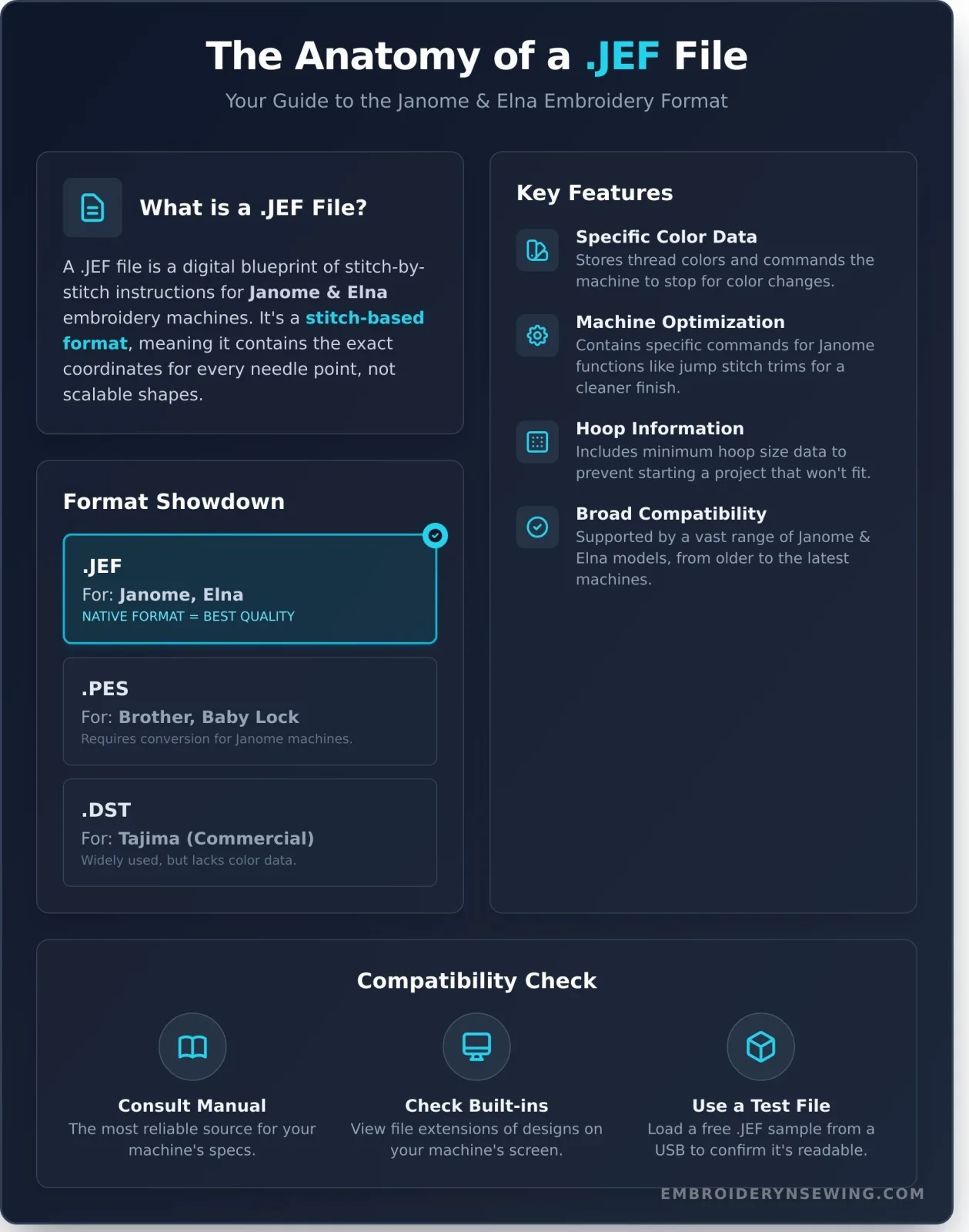
At its core, a JEF file is a set of digital instructions created specifically for Janome and Elna home embroidery machines. Think of it as a blueprint that tells your machine precisely what to do. Rather than a visual image, the file contains the technical data needed to create a design: where to place each stitch, what thread color to use, and when to trim the thread or pause for a color change.
The JEF format is what’s known as a ‘stitch-based’ file. This means it doesn’t contain scalable shapes or objects; instead, it holds the exact X-Y coordinates for every single needle penetration. The technical JEF file format structure details how this stitch data is encoded, ensuring your machine can read it perfectly. Because it's stitch-based, resizing a JEF file directly can often lead to poor quality, as it simply stretches the existing stitch points apart. For newer machines with larger hoops, Janome also introduced the JEF+ format, which supports bigger design dimensions.
### JEF vs. Other Common Formats (like PES, DST)
Just as people speak different languages, embroidery machines read different file formats. JEF is the native language for Janome and Elna. Other popular formats include PES for Brother machines and DST, a widely used commercial format for Tajima machines. While you can often convert files from one format to another, using native jef format embroidery patterns on your Janome guarantees the highest stitch quality. Converting can sometimes introduce errors in stitch density or lose important color-stop information, so sticking to the native format is always the safest bet.
Key Features of the JEF Format
The JEF format is more than just a collection of stitches; it’s optimized to work seamlessly with your machine. Key features include:
- Specific Color Data: It stores thread color information and the exact points where the machine should stop for you to change threads.
- Machine Optimization: The file contains commands that are specific to Janome functions, like how to handle jump stitches and trims for the cleanest possible result.
- Hoop Information: Each JEF file includes data on the minimum hoop size required to stitch the design, preventing you from accidentally starting a project that won't fit.
- Broad Compatibility: It is supported by a vast range of Janome and Elna models, from older Memory Craft machines to the latest releases, making it easy to find compatible jef format embroidery patterns.
Which Embroidery Machines Use JEF Files? A Compatibility Checklist
If you're wondering whether your machine can read jef format embroidery patterns, the answer is straightforward: the .JEF format is the native embroidery file type primarily for Janome machines. Because Janome manufactures machines for other popular brands, you'll also find that most Elna and some Bernette models are fully compatible with JEF files.
However, the world of embroidery is full of specific models and evolving technology. While JEF is the standard for a vast number of machines, it's always best to confirm your specific model's requirements. Let's break down the most common compatible machines.
Popular Janome Models
Janome has a long and respected history, and most of their embroidery-capable machines use the JEF format. This includes many models from their most popular series. Key examples include:
- Memory Craft Series: This flagship line is almost universally JEF-compatible. Popular models include the MC15000, MC12000, MC9900, MC550E, MC500E, and MC400E.
- Skyline Series: Embroidery and sewing combination machines like the Skyline S9 are designed to work seamlessly with JEF files.
Note: This is not an exhaustive list. Newer high-end models, like the Continental M17, may use the enhanced .JEF+ format. Always verify with your machine's documentation.
Compatible Elna and Bernette Models
The close manufacturing relationship between Janome, Elna, and Bernette means they often share technology, including file formats. Many Elna embroidery machines, particularly the eXpressive series (like the 830, 900, and 920), use the JEF format. Similarly, some Bernette models, such as the Deco 340, are built by Janome and use JEF files natively.
### How to Check Your Machine's Required Format
When in doubt, a quick check can save you time and frustration. Understanding specific Embroidery machine compatibility is crucial, and here are three simple ways to confirm your machine's format:
- Consult Your User Manual: Your machine’s manual is the most reliable source of information. Look for a section on "specifications" or "compatible file types."
- Check Built-In Designs: Navigate to the built-in embroidery designs on your machine's screen. The file extension displayed (.JEF, .DST, etc.) will tell you what format it reads.
- Use a Test File: Download a free JEF sample pattern onto a USB stick. If your machine can read and display the file, you're good to go!
## How to Use JEF Embroidery Patterns: From Download to First Stitch
Bringing a digital design to life on your Janome or Elna machine is a rewarding process. Once you understand the basic workflow, you'll be stitching out beautiful creations in no time. This guide breaks down the entire journey, from finding the perfect jef format embroidery patterns on our site to loading them onto your machine, ready for the first stitch.
Step 1: Downloading and Unzipping Your Files
After purchasing a design, you'll receive a download link. Clicking this link will save a single compressed file, usually with a .zip extension, to your computer. We bundle designs this way for a few key reasons: it keeps file sizes smaller for a faster download and groups all the design sizes, color charts, and instructions together in one neat package. To access your files:
- On Windows: Right-click the ZIP folder and select "Extract All..." Follow the on-screen prompts to choose a destination for the unzipped folder.
- On Mac: Simply double-click the ZIP folder. It will automatically create a new, unzipped folder in the same location.
Step 2: Transferring the JEF File via USB
The most common way to move a design to modern machines is with a USB flash drive. First, ensure your USB is formatted correctly (most machines prefer FAT32, but check your manual). Open the unzipped folder from Step 1 and locate the specific file ending in .jef. This single file holds all the crucial stitch coordinates and machine instructions, conforming to the official JEF File Format Technical Specifications. Copy only this .jef file and paste it directly onto your USB drive-avoid placing it inside extra folders. Once copied, safely eject the USB from your computer and insert it into the USB port on your embroidery machine.
Step 3: Opening the Design on Your Machine
With the USB stick inserted, turn on your embroidery machine. Navigate your machine’s menu to find the option to open a file, often represented by a folder or USB icon. Select the USB drive to view its contents. You should see the name of the .jef file you just copied. Select it with the stylus or your finger, and the design will load onto your machine’s editing screen. From here, you can position it, make minor adjustments, and get ready to embroider!
Ready to put these steps into action? Browse our collection of JEF embroidery patterns and start your next project today!
Finding the Best JEF Patterns: Free vs. Premium Designs
Once you're comfortable with your Janome or Elna machine, the hunt for new designs begins. While the allure of free patterns is strong, it's crucial to understand the difference between a freebie and a professionally digitized premium design. The quality of your pattern directly impacts the quality of your final stitch-out, your frustration level, and the wear on your machine.
Where to Find Free JEF Patterns
The best place to start for trustworthy freebies is the source. Janome's official website often provides a selection of high-quality designs specifically made for their machines. Many talented digitizers also offer free sample patterns on their blogs or in embroidery forums to showcase their work. However, be cautious when downloading from unvetted websites. Poorly digitized free files can lead to a host of problems, including thread nests, excessive jump stitches, and misaligned fills.
The Advantages of Premium Digitized Patterns
Investing in premium jef format embroidery patterns is an investment in a smooth, successful project. Professional digitizers are experts who meticulously plot every stitch. This expertise translates to:
- Fewer Errors: Say goodbye to constant thread breaks, unnecessary jump stitches, and poor density that can ruin your fabric.
- Flawless Results: Paid designs feature optimized stitch paths and underlay, ensuring crisp outlines, smooth satin stitches, and perfectly filled areas.
- Support and Instructions: Reputable sellers provide detailed instructions, color charts, and customer support if you run into any issues.
- Unique Artistry: Premium collections offer intricate, creative, and exclusive designs you simply won't find available for free.
What to Look For in a Quality Design Shop
Before purchasing any design, use this checklist to evaluate the seller and ensure you're getting a quality product:
- Real Stitch-Out Photos: Look for clear photographs of the actual embroidered design, not just a digital rendering. This proves the design has been tested.
- Detailed Design Information: The shop should clearly list the stitch count, finished dimensions, and the number of color stops for each pattern.
- Guaranteed JEF Format: Ensure the shop explicitly states that the JEF format is included in your download, often as part of a multi-format ZIP file.
We believe every project deserves a perfect foundation. That's why we guarantee the quality of every pattern we offer. Explore our professionally digitized designs and experience the difference for yourself.
Top Project Ideas for Your JEF Embroidery Patterns
Now that you understand the ins and outs of JEF files, the real fun begins! Your Janome or Elna machine is ready to transform ordinary items into personalized treasures. To spark your creativity, we’ve gathered some of our favorite project ideas perfect for using high-quality jef format embroidery patterns.
Personalizing Apparel and Accessories
Give your wardrobe and everyday items a custom touch. Machine embroidery adds a layer of personality that’s both durable and stylish, turning simple pieces into signature accessories.
- Monogram towels, bathrobes, and handkerchiefs using elegant JEF embroidery fonts.
- Add official sports logos or playful cartoon characters to kids' jackets and t-shirts.
- Embellish tote bags, sun hats, and denim with beautiful floral designs or seasonal patterns.
Creating Unique Home Decor
Elevate your living space with custom-stitched details. Embroidery adds texture, color, and a handmade feel that makes your house a home. These projects also make thoughtful, one-of-a-kind gifts for any occasion.
- Stitch intricate borders or centerpieces on throw pillows and table runners from our Home Decor collection.
- Create charming, custom tea towels with witty quotes or themed designs from our Kitchen & Holiday categories.
- Make stunning framed embroidery art for a nursery, office, or as a personalized wedding gift.
Crafting for Kids and Babies
There’s nothing more special than a handmade gift for a little one. Our collection of jef format embroidery patterns includes countless adorable and fun designs perfect for baby showers, birthdays, and back-to-school.
- Decorate baby onesies, bibs, and blankets with cute animal or nursery-themed designs.
- Explore the magic of 'in-the-hoop' (ITH) projects to create soft toys, felt puzzles, and hair accessories.
- Personalize library totes, pencil cases, and backpacks to make school gear extra special.
These ideas are just the beginning. The versatility of JEF patterns means your creative potential is nearly limitless. Ready to find the perfect design for your next project? Explore the full collection at embroiderynsewing.com and start stitching today!
Unlock Your Creative Potential with JEF Embroidery Patterns
You now have a comprehensive understanding of the JEF format, from its seamless compatibility with Janome and Elna machines to the simple steps required to bring a digital design to life on your fabric. Armed with this knowledge, you can confidently navigate the world of machine embroidery, knowing exactly how to find, download, and use the files that work perfectly with your equipment. The creative possibilities are truly endless.
Whether you are personalizing a baby blanket, embellishing a denim jacket, or creating unique home decor, the right jef format embroidery patterns are the starting point for a beautiful, professional-quality result. Your machine is threaded and ready; all that's missing is your next spark of inspiration.
Ready to get stitching? Find your next project! Shop our huge collection of JEF embroidery patterns. Explore thousands of high-quality designs, all available as instant digital downloads and guaranteed to be compatible with all Janome and Elna machines. Your next masterpiece is just a click away. Happy stitching!
Frequently Asked Questions About JEF Patterns
Can I convert a PES file to JEF format?
Yes, you can easily convert PES files, which are native to Brother machines, to the JEF format for your Janome or Elna. This requires embroidery software. Programs like Embrilliance Express (a free tool), Hatch Embroidery, or even online converters can perform this task. After converting, it's a good practice to open the new JEF file in your software to double-check for any stitch distortions or color changes before sending it to your machine for stitching.
What is the difference between JEF and JEF+ formats?
JEF is the standard embroidery format for most Janome and Elna machines. The JEF+ format was introduced for newer, high-end models with larger hoop capabilities, like the Memory Craft 11000 and above. JEF+ files contain extra information, such as precise hoop positioning data for these larger hoops. While most newer machines can read both JEF and JEF+, older machines can typically only read the standard JEF format, so it's important to know your machine's compatibility.
Why won't my Janome machine read my JEF file from the USB stick?
There are a few common reasons for this issue. First, ensure the JEF file is in the root directory of the USB stick, not inside a folder, as many machines cannot navigate folders. Second, check that your USB is formatted to FAT16 or FAT32, not NTFS. Finally, confirm the design's stitch count and dimensions are not too large for your machine's maximum hoop size. A design sized for a 5x7 hoop won't load on a machine with only a 4x4 capability.
How do I know what size hoop to use for a JEF pattern?
The pattern designer should always specify the required hoop size in the product description or a downloadable PDF file. If this information is missing, you can check the design's dimensions yourself. Most embroidery software will display the height and width of the design in millimeters or inches. You can then select the smallest of your machine's hoops that the entire design will fit within, ensuring you leave a small margin around the edges for best results.
Do I need special software to use JEF embroidery patterns?
You don't need special software just to stitch out jef format embroidery patterns. You can transfer the files directly from your computer to your Janome or Elna machine via a USB stick. However, having embroidery software is highly recommended. Programs like Bernina ArtLink (free) or Embrilliance Essentials allow you to view, organize, resize, and combine designs before stitching, giving you much more creative control and preventing potential mistakes on your fabric.
Are all JEF files from Etsy or other marketplaces good quality?
Not necessarily. The quality of jef format embroidery patterns depends entirely on the skill of the digitizer who created them, not the marketplace itself. A poorly digitized design can result in gapping, puckering, and excessive jump stitches. Before purchasing, always read reviews, look for photos of actual stitch-outs from the seller or other customers, and check the stitch count. A reputable digitizer will provide clear information and have positive feedback from other embroiderers.