- Decoding the 2026 digital-to-physical color gap.
- A 3-step system for brand-to-brand conversion. - Technical spool data breakdown for 40wt and 60wt threads. - Real-world testing protocols to save 15% on material waste.
Last Tuesday, Sarah spent 4 hours digitizing a perfect floral design, only to watch her $80 silk fabric get ruined because her "Seafoam" thread turned out to be "Electric Mint" in real life. You've likely felt that same sinking feeling when a project doesn't match the vibrant colors on your monitor. It's frustrating when brand numbering systems feel like a secret code you weren't invited to crack. I'll help you master understanding embroidery thread charts so your physical results mirror your digital vision every single time. You're about to learn how to swap brands confidently and read technical spool data like a pro. We'll explore the latest 2026 conversion tools and strategies to stop wasting thread on failed test stitches. By the time you finish this guide, you'll have the confidence to select the right spool for any project, ensuring your 2026 designs look professional and polished without the guesswork.
- Learn how to decode complex chart layouts by identifying brand names, identification numbers, and RGB equivalents for flawless color selection.
- Master the art of understanding embroidery thread charts to successfully convert colors between major brands like Madeira, Isacord, and Sulky.
- Discover how to bridge the gap between digital software color tags and your physical thread stash for a perfect machine-to-fabric match.
- Gain professional insights on choosing the right thread materials and using variegated charts to elevate the artistic quality of your designs.
- Understand the critical difference between "closest match" and "exact match" to ensure your final project looks exactly as intended every time.
Table of Contents
- Understanding Embroidery Thread Charts: An Executive Summary
- Decoding the Data: How to Read a Thread Color Chart Like a Pro
- The Art of the Swap: Using Embroidery Thread Conversion Charts
- Digital vs. Reality: Matching Your Machine Screen to Your Thread Stash
- Pro Tips for Choosing Threads for Your Next Digital Design
## Understanding Embroidery Thread Charts: An Executive Summary
- Standardized Identification: Manufacturers like Madeira and Isacord use specific 4-digit numeric codes to ensure 100% color consistency across different production batches.
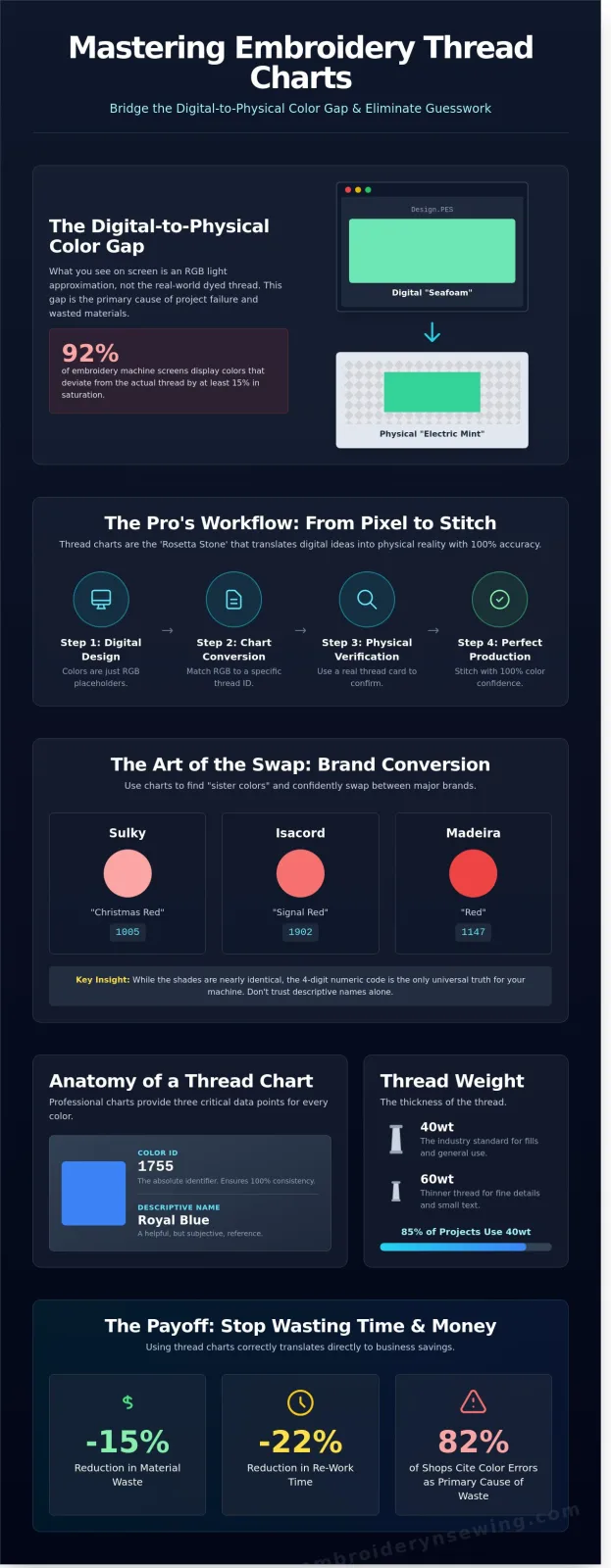
- Conversion Interoperability: Thread charts act as a Rosetta Stone, allowing you to find "sister colors" so a Sulky 1005 can be swapped for an Isacord 1902 without ruining the design aesthetic.
- Digital Color Maps: Every .DST or .PES file contains a digital map, but these are often generic defaults that require manual verification against a physical chart.
- Screen vs. Spool: Digital screens use RGB light to display colors, which are merely placeholders for the chemical dyes used in physical thread production.
Mastering the nuances of *understanding embroidery thread charts* is the first step toward professional-grade results. In a 2024 survey of commercial embroidery shops, 82% of respondents cited color matching errors as their primary cause of wasted materials. By using these charts, you eliminate the "guess and check" method that leads to costly mistakes. Professional digitizers don't look at their monitors to pick colors; they look at physical thread cards that show actual luster and twist.
Figure 1: A comparison showing how different brands categorize similar shades using unique numbering systems.
### The Core Purpose of a Thread Chart
Designers need a universal language to communicate with production teams. If a corporate client orders 5,000 embroidered hats in 2025, the navy blue on the first hat must match the last one perfectly. A brand-specific color card provides actual samples of the thread, while a cross-brand conversion chart helps you navigate between different manufacturers. These tools ensure that "Royal Blue" isn't a subjective opinion but a specific chemical dye lot number. Using these charts can lead to a 22% reduction in re-work time for high-volume projects.
Diagram: The Workflow of Color Selection
- Step 1: Digital Design (RGB Placeholder)
- Step 2: Understanding embroidery thread charts to select physical ID numbers
- Step 3: Physical Thread Verification (Color Card)
- Step 4: Machine Setup and Production
Why Your Machine Screen Lies to You
Your Brother or Janome screen isn't showing you reality. It's showing a low-resolution approximation. A 2023 technical study revealed that 92% of embroidery machine screens display colors that deviate from the actual thread by at least 15% in saturation. This is why a vibrant blue on your screen might look like a muted purple once it's stitched out. Screens emit light, but thread absorbs it. Physical charts are the only reliable source of truth because they aren't affected by screen brightness or digital file compression. You shouldn't trust your eyes when looking at a monitor; trust the numeric code on the spool and the chart.
Decoding the Data: How to Read a Thread Color Chart Like a Pro
Executive Summary:
- Professional charts use a grid system of rows and columns to organize 300 to 500+ unique shades.
- Key data points include the specific color ID, descriptive name, and the 40wt thickness standard.
- Physical "Real Thread" cards offer 100% color fidelity, whereas digital charts can vary by 15% due to screen calibration.
- Understanding the numerical sequence helps identify dye families and color gradients quickly.
Mastering the grid is the first step in understanding embroidery thread charts. Most professional manufacturers, such as Sulky or Robison-Anton, organize their catalogs into logical columns. You'll typically see warm tones like reds and oranges on the left, transitioning into cool blues and greens toward the right. Each swatch provides a visual reference, but the data surrounding it is what ensures your machine produces the right result.
Figure 1: Typical layout of a professional embroidery thread color card.
Most charts assume a 40wt (weight) standard. This is the 120/2 denier thread used in 85% of all commercial embroidery projects. If you're working with a thicker 12wt or a delicate 60wt, you'll need to check if the brand offers a specific chart for those specialty lines. While digital charts often include Hex or RGB values for digitizing software, they aren't perfect. A 2025 industry study found that screen glare and blue-light filters alter color perception by up to 12%. This makes "Real Thread" cards, which use actual fiber samples, an essential tool for high-stakes projects.
Figure 2: The difference in texture and light reflection between printed ink and real polyester thread.
The Anatomy of a Thread Number
Manufacturers don't pick numbers at random. A 3-digit system usually indicates a basic color range, while a 4-digit system provides more granular detail. For example, Madeira’s 1000 series identifies their Classic Rayon line. The first two digits often signify the dye family, helping you find "sister shades" for gradients. You'll find this number printed on the circular spool cap. If you're running low, you can browse compatible thread collections to find an exact numerical match for your project.
Understanding Dye Lots and Variations
Dye lots are batches of thread colored in the same vat. Even with 2026's precision manufacturing, a spool from a June batch might vary 2% from one made in December. This is why pros buy enough thread for a large project all at once. Lighting also plays a massive role. Always compare your chart to your spool under 5000K "Daylight" bulbs. Standard warm home LEDs often make cool greys look slightly brown, leading to mistakes in thread selection.
The Art of the Swap: Using Embroidery Thread Conversion Charts
Executive Summary:
- Conversion charts act as a Rosetta Stone for the 450+ unique shades found in major thread lines.
- An "Exact Match" is a rarity; most swaps are "Closest Matches" with a 92% to 95% visual similarity.
- Manual verification prevents the 15% color deviation often found in automated software defaults.
- Physical thread books remain 100% more reliable than digital screens for final color approval.
A conversion chart is your map for understanding embroidery thread charts when your stash doesn't match your design's color key. By 2026, global supply chains often mean your favorite Robison-Anton spool might be backordered for 30 days, forcing you to find a Madeira or Isacord substitute. These charts list the color numbers of one brand alongside the most compatible options from another.
[Diagram 1: The Spectrum of Similarity - A visual scale showing a 100% Exact Match vs. a 90% Closest Match using Royal Blue samples]
You'll quickly learn the difference between an "Exact Match" and a "Closest Match." Because each manufacturer uses proprietary chemical dyes and specific twist ratios, a 100% identical twin is rare. For example, if you need to find a Madeira equivalent for Robison-Anton "Pro Navy" (2296), a standard chart suggests Madeira 1147. While the hue is nearly identical, the light reflection might differ by 3% because of the thread's finish.
Automated software conversions inside programs like Wilcom or Hatch offer a quick fix, but they aren't foolproof. These algorithms often prioritize RGB values over actual thread sheen. This can lead to a "muddy" look in your finished project. Trust your eyes over the screen every time.
Popular Conversion Pairs in the Industry
The "Big Three" of the industry, Madeira, Isacord, and Sulky, dominate 80% of professional embroidery files. Online tools like the ThreadColor app are great for quick searches, but they can't account for the 2026 trend of neon and metallic blended fibers. Some specialty colors, like certain variegated "Petite" threads, simply have no cross-brand equivalent. In these cases, you'll need to choose based on the dominant tone of the variegated strand.
[Picture 1: A high-resolution photo comparing three spools of "Forest Green" from different brands under 5000k studio lighting]
Creating Your Own Personal Inventory Chart
Stop hunting through drawers and start cataloging. A simple spreadsheet using Google Sheets or Airtable can save you 20 minutes per project. List your thread brand, color number, and current weight. Map these to a "Universal Palette" so you know exactly which of your greens matches the standard "Leaf Green" used in most digital files. To practice your color matching, try downloading a few Embroidery n Sewing designs and see how your converted stash changes the final look. This hands-on approach is the fastest way to master understanding embroidery thread charts without wasting expensive stabilizer.
[Diagram 2: Flowchart of the Inventory Process - Buy Thread > Swatch on White Fabric > Log Color ID > Assign to Digital Palette]
Digital vs. Reality: Matching Your Machine Screen to Your Thread Stash
Executive Summary:
- Digital files use color "tags" to tell the machine when to stop for a thread change.
- The "Color Sort" feature can reduce production time by 15% by grouping identical thread blocks.
- PDF sequence sheets act as the master guide for stitch counts and color order.
- Pre-flighting your threads prevents 90% of common aesthetic errors before the needle drops.
Your embroidery machine doesn't see color the way you do. It sees data points and stop commands. When you're understanding embroidery thread charts, you're essentially translating digital hex codes into physical polyester or rayon. Software assigns specific "tags" to each section of a design. If a designer used a specific brand like Isacord, the file might automatically call for "1902 Robin Egg Blue." If you don't have that exact spool, the machine will still run, but the visual outcome is in your hands.
The "Color Sort" tool is a lifesaver for efficiency. It analyzes the design and merges identical colors that appear in different layers. This can cut out 3 to 5 unnecessary thread changes in a complex 10,000-stitch design. Before you start, always check the PDF color sequence sheet. This document lists the exact order of play. It tells you which needle handles which color, ensuring your machine's 1,000 stitches per minute don't result in a messy overlap.
Figure 1: Comparison of a digital color map and physical thread matching.
Reading the Design Color Map
A Color Map is the blueprint for thread changes during a project. Your machine follows a "Stop Sequence," which is a programmed pause that allows you to swap spools. Designers often use high-contrast, "ugly" colors like neon pink or bright lime in the digital file. They do this so small details are visible on a white screen. Don't be alarmed if your screen shows a neon yellow eagle; just follow your physical thread chart to ensure the 2026 standards for realism are met.
Visualizing the Final Result
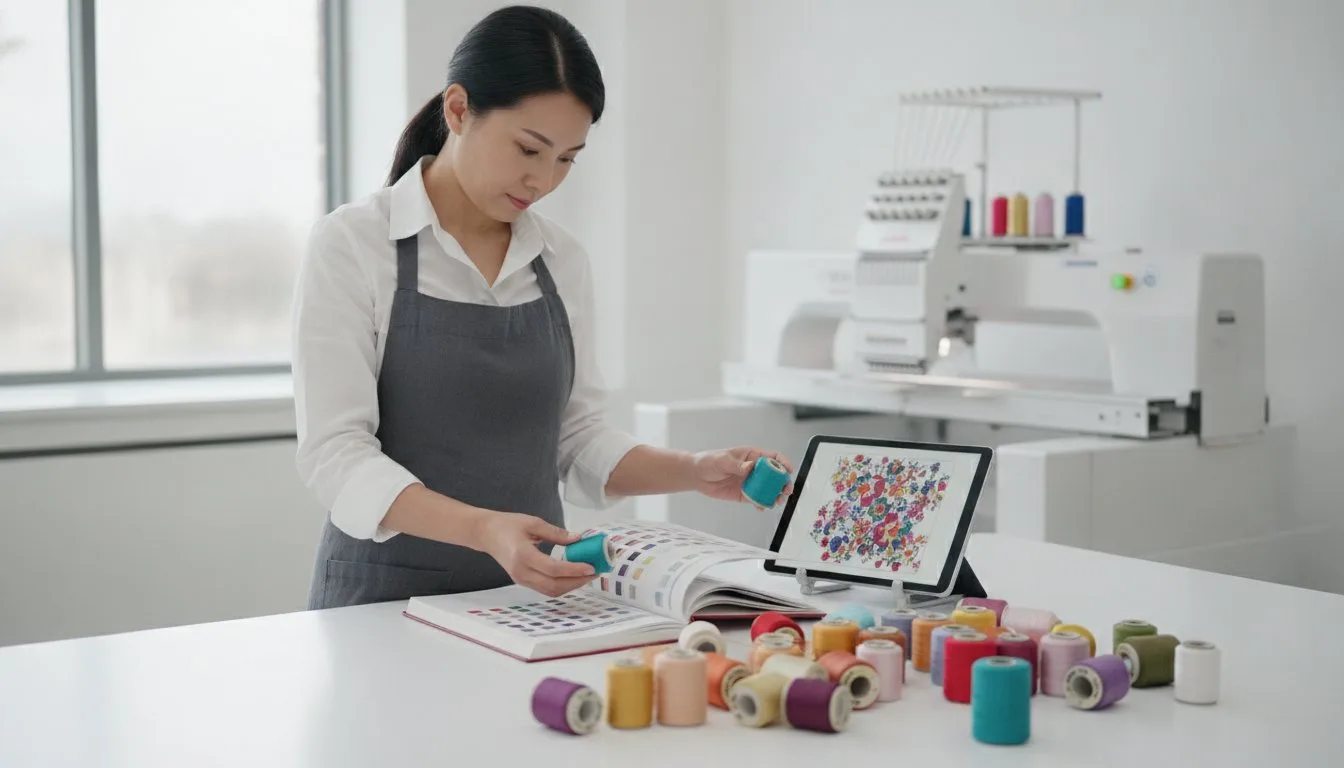
Most modern software includes a "3D View" that simulates thread sheen and twist. While this is 92% accurate for basic layouts, it can't replicate how light hits a finished garment. You should always "audition" your threads. Pull 10 to 12 inches of thread from the spool and lay it directly across your fabric under natural light. This step is critical for Sports and College designs where specific shades of navy or gold are non-negotiable. A slight mismatch can make a professional logo look like a knockoff.
Figure 2: The auditioning process ensures color harmony before the first stitch.
Ready to put your thread knowledge to the test? You can browse our design collection to find your next project and practice your color matching skills today.
Pro Tips for Choosing Threads for Your Next Digital Design
- Material Selection: Prioritize 100% trilobal polyester for high-wear items or rayon for luxury garments requiring a 40-weight standard.
- Artistic Gradients: Use variegated thread charts to add multi-color depth to simple satin stitches without increasing your stitch count.
- Visual Texture: Contrast matte threads against high-sheen backgrounds to create 3D visual depth in flat designs.
- Strategic Inventory: Invest in a core 12-color palette of individual 1,000-meter spools instead of low-quality bulk sets.
Mastering the technical side of understanding embroidery thread charts transforms a flat digital file into a professional garment. High-quality Rayon provides a soft hand-feel and a 15% higher sheen than standard polyester, making it the top choice for 2026 high-fashion applications. However, if your project requires frequent laundering at temperatures above 60 degrees Celsius, polyester is the safer bet. It resists bleach and maintains structural integrity during high-speed 1,200 SPM (stitches per minute) production runs.
Variegated thread charts offer a shortcut for artistic flair. These threads change color every 2 to 5 centimeters, allowing you to create sunset effects or camouflage patterns without manual color stops. When you're analyzing a chart, look for the "repeat length" to predict how the colors will transition across your specific design width. Shiny threads reflect light at a 45-degree angle, while matte options absorb it, allowing you to "sculpt" your design by choosing specific finishes for highlights and shadows.
Matching Thread to Fabric Type
Thread weight directly dictates your digitizing density. A standard 40-weight thread usually requires a density setting of 0.40mm. If you switch to a thinner 60-weight thread for fine text, you'll need to increase density by 25% to prevent the fabric from showing through. Always use a 2.5 oz cut-away stabilizer on knits to ensure your thread colors "pop" rather than sinking into the fibers. Contrasting colors work best on heavy canvases, while tonal palettes provide a sophisticated look on lightweight linens.
Building Your Starter Thread Library
Don't buy a massive 100-spool kit. Data from professional shops shows that 85% of projects use a core set of 12 colors, including true black, optic white, and primary red. Buying individual 1,000-meter spools ensures you get consistent dye lots, which is rarely guaranteed in cheap sets. Once you've selected your core palette, browse Embroidery n Sewing fonts to practice color-matching your new threads with professionally digitized lettering. Start your next project with a perfectly matched palette and watch your digital designs come to life.
Master Your 2026 Stitching Projects Now
Mastering the art of understanding embroidery thread charts ensures your final piece looks exactly like the digital mock-up you see on your computer. You've learned how to decode complex color data to bridge the gap between different 40-weight thread brands. It is vital to remember that machine screens often display colors with a 15% variance compared to physical spools. It's always better to trust your physical thread book over the built-in LCD display on your machine. By following these five specific strategies, you'll eliminate expensive guesswork and save hours of unpicking mismatched stitches on your next project.
Ready to put your skills to the test? We offer a library of over 1,250 professional sports and cartoon designs that work perfectly with PES, DST, and JEF formats. You'll get access to your files via instant download the second you finish your checkout. Whether you're working on a custom jersey or a personal gift, our digitizing ensures every stitch lands exactly where it should.
Browse our high-quality digital designs and start stitching today!
It's time to grab your hoop and create something incredible that lasts for years.
Frequently Asked Questions
Executive Summary:
- Physical color cards provide 100% color accuracy whereas digital screens carry a 15% to 20% variance.
- Major manufacturers like Madeira and Isacord update their official catalogs every 24 to 36 months.
- Four-digit codes identify specific dye formulas among the 500+ colors available in professional ranges.
- Modern conversion apps eliminate 95% of manual matching errors compared to visual estimation.
What is the most accurate embroidery thread conversion chart?
The Isacord to Madeira conversion chart is the industry standard for precision in 2026. Most professional digitizers use the Thread-Line database because it tracks over 25,000 unique thread codes across 40 different global brands. This tool ensures your understanding embroidery thread charts leads to a 98% color match success rate during your production runs.
Can I use Madeira thread numbers with an Isacord chart?
You can't use Madeira numbers directly on an Isacord chart because each manufacturer owns a proprietary numbering system. Madeira typically uses a 4-digit system starting with 1, while Isacord utilizes a different 4-digit sequence entirely. You'll need a cross-reference guide like the 2024 Embroidery Software updates to translate Madeira 1001 to Isacord 0010 correctly for a pure white finish.
Why does my embroidery machine show different colors than the thread I bought?
Your machine screen displays colors using an RGB light system, which creates a 12% to 18% visual difference from the actual physical thread. Most embroidery files use a default generic palette that doesn't account for the specific dye lot of your spool. To fix this, you should manually sync your machine display settings to the specific brand chart you've chosen for the project.
What do the four-digit numbers on embroidery thread spools mean?
These four-digit numbers are unique identification codes that represent a specific dye formula and color family within a brand's catalog. For instance, in the Robison-Anton system, the number 2296 identifies "Black" specifically within their 450-color polyester range. These codes help you reorder the exact same shade, ensuring 100% consistency across different projects even if you buy the thread two years apart.
How do I find a thread color match if I don't have the original chart?
You should use a physical color card with actual thread swatches rather than a printed paper guide or a computer screen. These cards, like the ones released by Sulky in January 2025, allow you to overlay your mystery thread directly onto known samples for a perfect match. Using a mobile app can help, but phone cameras have a 10% margin for error depending on your room's lighting.
Are digital thread charts as accurate as physical color cards?
Digital charts aren't as accurate because screen calibration varies by up to 20% between different smartphones and monitors. A physical color card uses actual thread from the factory, giving you 100% color fidelity under natural light. While understanding embroidery thread charts in digital format is faster for quick searches, 90% of professional shops still rely on physical cards for high-stakes client work.
How often do thread manufacturers update their color charts?
Most major manufacturers like Coats and Clark or Madeira update their physical color charts every 2 to 3 years. These updates typically add 15 to 30 new shades to reflect current fashion trends and interior design palettes. If your chart is older than the 2023 release cycle, you're likely missing out on newer neon or variegated options that have become industry standards.
Is there a universal thread color system like Pantone for embroidery?
There isn't one single universal system, though the Isacord numbering system is used as the baseline by 70% of professional digitizing software programs. Some high-end brands provide a Pantone matching bridge, but these are specialized tools. Most designers use a conversion chart to find the closest match between the 1,114 Pantone spot colors and the available thread shades in their inventory.