

Have you ever found yourself lost in a sea of online embroidery designs, clicking through endless websites only to feel more confused than inspired? You finally spot the perfect pattern, but you're faced with a bewildering list of file formats-PES, JEF, DST-and a nagging worry: what if it stitches out as a tangled, bird's-nested mess? This frustration is a common hurdle for many machine embroidery enthusiasts, but there is a simple, organized solution waiting to be discovered.
Imagine a digital treasure chest filled with thousands of flawless, professionally digitized patterns, all in one place. This is the magic of a high-quality online embroidery library. In this ultimate guide, we'll demystify these incredible resources. You will learn exactly how to navigate vast collections, confidently choose the correct file format for your specific machine, and spot the tell-tale signs of a design that will stitch out beautifully. Get ready to stop searching and start building a personal collection of patterns you'll love to use again and again.
## What Exactly is an Online Embroidery Library?
Think of an online **embroidery library** as a digital superstore for your embroidery machine. It’s a vast marketplace filled with thousands of machine embroidery files, ready to be downloaded and stitched. Much like a digital bookstore provides e-books or a stock photo site offers images, these libraries provide the creative assets for modern embroiderers. This model replaces the old, limited methods of using built-in machine designs or purchasing physical cartridges, offering unparalleled selection and instant creative freedom.
The core value is simple: you gain immediate access to a world of designs without leaving your craft room. Instead of being confined to a few pre-loaded patterns, you can browse, purchase, and download the perfect design for any project in minutes.
### The Evolution from Physical to Digital Embroidery
Not long ago, expanding your design collection meant buying expensive and clunky embroidery cards or floppy disks. The choices were limited, and you had to wait for them to arrive by mail. The internet, however, completely revolutionized the craft. The fascinating history of machine embroidery shows a clear progression from mechanical systems to the computerized processes that make today’s digital access possible. This shift means a design you fall in love with online can be on your machine and ready to stitch in less time than it takes to brew a cup of coffee.
Tapping into a digital design library offers significant advantages that empower your creativity and streamline your workflow. The benefits go far beyond simple convenience, transforming how you approach every project.
- Endless Variety: Gain access to thousands of unique designs from talented artists around the globe. Whether you're looking for intricate free-standing lace, classic redwork, or trendy appliqué patterns, you'll find countless options in one centralized place.
- Immediacy and Convenience: Inspiration doesn't have to wait. Find a design, download it instantly in the correct format for your machine (like PES, JEF, or DST), and start your project right away.
- Cost-Effectiveness: Instead of investing in expensive software or large, costly collections, you can purchase designs individually. This pay-per-design model allows you to build a custom collection that perfectly suits your style and budget.
- A Fountain of Inspiration: Simply browsing an extensive embroidery library can spark new ideas. You can discover emerging trends, learn about different stitching techniques, and find the perfect pattern for a project you hadn't even imagined yet.
Navigating an Embroidery Library: A Beginner's Walkthrough
Stepping into a digital embroidery library for the first time can feel like walking into a massive craft store-exciting but a little overwhelming! With thousands of designs at your fingertips, knowing how to find the perfect one is key. This simple walkthrough will turn you into a pro navigator in no time, helping you find exactly what you need for your next project.
Browsing by Category vs. Using the Search Bar
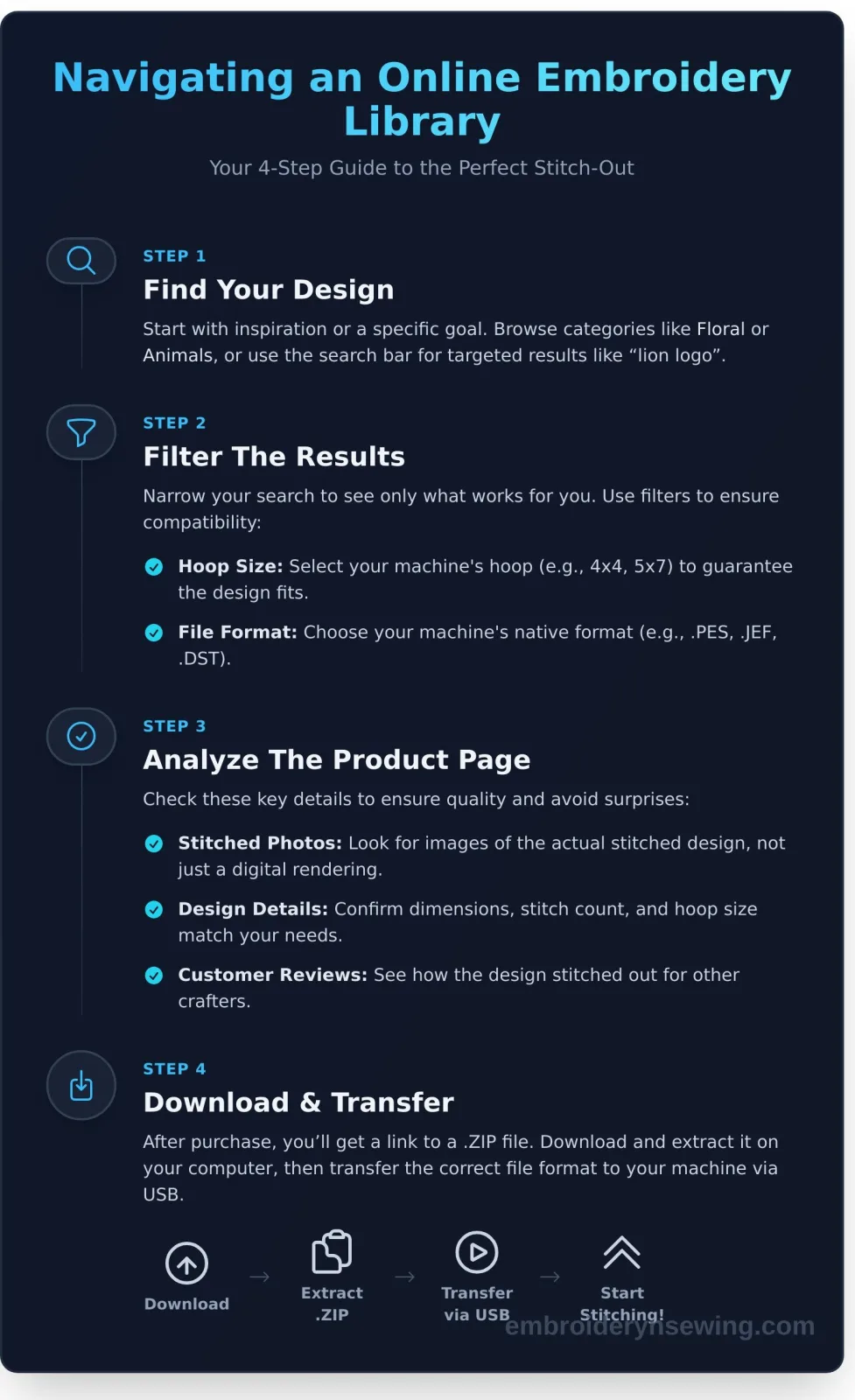
Your search starts with a choice: are you looking for inspiration or something specific? For general ideas, browse by category. These are often sorted by theme (like Holidays, Animals, or Floral) or technique (such as Appliqué, In-the-Hoop projects, and Fonts). If you already have a project in mind, use the search bar for targeted results. Searching for "lion logo" will be much faster than scrolling through the entire "Animals" category.
Once you have your initial results, use filters to narrow them down. This is the most powerful tool in any online embroidery library. You can filter by:
- Hoop Size: Select your machine's hoop size (e.g., 4x4, 5x7) to see only designs that will physically fit.
- Stitch Count: A lower stitch count is ideal for delicate fabrics, while a higher count creates a dense, rich design.
- File Format: Ensure your machine's format (like .PES, .DST, .JEF) is available before you fall in love with a design.
The Anatomy of a Design Product Page
When you click on a design, you'll land on its product page. Pay close attention to these key details to ensure a successful stitch-out:
- Images: Look for high-quality photos of the actual stitched-out design, not just a digital rendering. This shows you the true quality.
- Design Details: Here you’ll find exact dimensions, the final stitch count, and the minimum required hoop size. Always double-check this against your machine's capabilities.
- Included Formats: A list of all included machine file formats. Confirm yours is on the list!
- Customer Reviews: See what other stitchers have said. Reviews can offer valuable insight into how well the design sews out.
The Checkout and Download Process Explained
Once you’ve chosen your design, simply add it to your cart and complete the purchase. You won't receive a physical item; instead, you'll get a download link. The designs are delivered in a single .ZIP file. You'll need to save this to your computer and "unzip" or "extract" it to access the individual design files for your machine. From there, you can transfer the correct format to your embroidery machine via USB. Ready to browse? Explore thousands of designs in our library!
The Nitty-Gritty: Understanding File Formats, Sizing, and Quality
Diving into the world of machine embroidery is exciting, but the technical details can feel overwhelming. Let's break down the three most important concepts you need to grasp when selecting a design: file formats, stitch density, and overall quality. Understanding these elements is the key to ensuring your projects stitch out beautifully every single time.
Decoding Common Embroidery File Formats
Think of embroidery file formats as different languages. Your embroidery machine only understands its specific "native" language. A Brother machine can't read a Janome file, and vice-versa. That's why designs come in various formats like PES, DST, JEF, and EXP. Here are a few of the most common:
- PES: Brother, Baby Lock, Deco
- JEF: Janome, Elna, Kenmore
- DST: Tajima (a universal format compatible with most commercial machines)
- EXP: Bernina, Melco
- VP3: Husqvarna Viking, Pfaff
Thankfully, you don't need to be a linguist. Nearly every design you download from a reputable embroidery library comes in a "multi-format" ZIP file. This single download contains the design in all major formats, so you can simply find the one that matches your machine.
Why Stitch Count and Density Matter
The stitch count tells you exactly how many stitches are in a design-a higher count means more detail and a longer sew time. More importantly, stitch density refers to how close those stitches are. A well-digitized design has the perfect density for its purpose.
If a design is too dense, you risk thread breaks, needle snaps, and stiff, "bulletproof" embroidery. If it's too sparse, the fabric underneath will show through, making the design look thin and incomplete. Always match the design to your material; a light, airy design is best for a t-shirt, while a sturdy denim jacket can handle a denser pattern.
How to Judge Design Quality Before You Buy
The secret to a great result is starting with a great design file. Before you click "buy," become a design detective. Here’s what to look for in a high-quality file:
- Look for stitched samples: A professional digitizer will always show a photo of the actual stitched-out design, not just a computer-generated image. This proves the design works in the real world.
- Examine the details: Zoom in on the sample photo. Are the lines clean and crisp? Are there messy jump stitches crisscrossing the design? A well-planned file minimizes these for a cleaner finish.
- Read the reviews: See what other embroiderers have said. Their feedback is invaluable for spotting potential issues or praising a digitizer's excellent work.
- Avoid cheap conversions: Be wary of designs that look like a photograph was simply run through an automatic converter. These often lack the proper layering and stitch direction needed for a professional result.
Free vs. Paid Designs: Making the Right Choice for Your Project
When you're new to machine embroidery, the temptation of free designs is strong. They offer a risk-free way to learn your machine and build confidence. But as you advance, you'll notice a significant difference in quality between freebies and premium, paid designs. Understanding this distinction is key to avoiding frustration and ensuring your projects look professional.
The Pros and Cons of Free Embroidery Designs
Free designs are fantastic for practice. Use them to test new stabilizers, thread colors, or machine settings without worrying about wasting a purchased file. However, freebies can be a mixed bag. They often have lower stitch quality, which can lead to gaps, poor registration, and thread breaks. The selection is also typically limited to simpler or promotional designs. For reliable freebies, look for weekly or promotional offers from a trusted embroidery library, as these are often professionally digitized to showcase their quality.
What Are You Paying For with a Premium Design?
Investing in a premium design means you're paying for expertise and peace of mind. While the cost is a factor, it reflects the professional effort that goes into creating a flawless file. Here’s what your purchase typically covers:
- Professional Digitizing: An expert digitizer has meticulously planned the stitch path, underlay, and density to ensure the design sews out smoothly and looks beautiful without puckering or gaps.
- Thorough Testing: Reputable designers test-stitch their files to catch and fix any errors before they reach you, saving you frustration and wasted materials.
- Artist and Business Support: Your purchase directly compensates the artist for their skill and time, supporting a creative small business.
- Customer Service: If you encounter a problem with the file, a paid design usually comes with access to support to help you resolve it.
Understanding Licensing: Personal vs. Commercial Use
A design’s license dictates how you can legally use it. Personal use generally means you can stitch the design for yourself or as gifts, but not for profit. Commercial use allows you to sell the physical items you create with the design, such as embroidered shirts or tea towels. Licensing terms vary drastically, so always check the policy for each design, even within the same embroidery library. Some designers may limit the number of commercial items you can sell. Understanding these terms protects both you and the designer. For more detailed guides on embroidery, check out the resources at embroiderynsewing.com.
Building Your Personal Design Collection: Tips for Smart Shopping
As you move from one-off projects to a true passion for machine embroidery, your focus will shift from buying a single design to building a versatile, long-term collection. A well-curated digital stash saves you time and money, ensuring you always have the perfect element on hand. Thinking strategically about your purchases is the key to creating a personal embroidery library you’ll turn to again and again.
Start with the Essentials: Foundational Designs
Before splurging on complex, niche designs, invest in foundational pieces that offer maximum flexibility. These are the building blocks you can use to customize, frame, and enhance other patterns. We recommend starting with:
- High-Quality Fonts: A few excellent embroidery fonts (a script, a block, and a serif) are invaluable for personalizing gifts, monogramming linens, and adding names to projects.
- Simple Shapes and Borders: Basic frames, corners, and geometric shapes can elegantly contain other designs or stand alone for a minimalist look.
- Redwork or Line-Art: These simple, single-color designs stitch out incredibly fast, making them perfect for tea towels, quilt blocks, and quick gifts when you're short on time.
How to Maximize Your Budget with Bundles and Sales
Growing your collection doesn't have to break the bank. Smart shopping is part of the fun! Design packs and themed bundles are one of the best ways to get more for your money, significantly lowering the cost-per-design. To catch the best deals, be sure to sign up for newsletters from your favorite shops-this is the number one way to get notified about seasonal sales, flash deals, and special promotions. Also, keep an eye out for clearance or "dollar deal" sections where you can find hidden gems at a steep discount.
Organizing Your Digital Embroidery Files
A disorganized folder of designs is just as frustrating as not having the right one. A simple filing system on your computer will save you headaches and prevent you from accidentally re-purchasing patterns. A logical structure is key:
- Create a main folder called "Embroidery Designs."
- Inside, create sub-folders for each designer or store you purchase from (e.g., EmbroideryNsewing).
- Within each store folder, organize designs by theme (e.g., Christmas, Floral, Animals, Fonts).
- Pro Tip: Always keep the original .ZIP file you downloaded. It contains all the different machine formats and serves as a perfect backup.
With these tips, you're ready to build a fantastic and functional collection. Start building your collection with our best-selling designs!
Your Digital Thread Awaits: Start Stitching Today
You've journeyed through the digital landscape of machine embroidery, from understanding the fundamentals of an online design source to the technical details of file formats and sizing. You now know how to spot quality, weigh the benefits of free versus paid designs, and strategically build a collection that reflects your unique style. An embroidery library is no longer a mystery but a powerful tool at your fingertips, ready to fuel your creative passion.
Are you ready to transform that knowledge into stunning, tangible art? Your next masterpiece is just a click away. Explore our library of thousands of high-quality embroidery designs today! You’ll discover a huge selection of themes, from sports to holidays, all professionally digitized and tested for flawless stitch-outs. With instant downloads for all major machine formats, you can start your next project in minutes.
Go ahead, unleash your creativity and make something beautiful.
Frequently Asked Questions
How do I get designs from my computer to my embroidery machine?
After downloading, the design is typically in a compressed ZIP folder. You must first 'extract' the files on your computer. Next, identify the correct file format for your specific machine (e.g., .PES for Brother). Transfer this single file to a USB flash drive, plug the drive into your embroidery machine, and then you can select the design from your machine’s interface. Some models also support a direct cable or Wi-Fi connection from your computer.
What is the most common embroidery file format for home machines?
There is no single universal format; it is specific to the machine's manufacturer. However, some of the most prevalent formats include PES (for Brother, Babylock), JEF (for Janome), and EXP (for Bernina). Most online pattern shops provide a download that includes multiple formats in one folder. Always consult your machine's manual to confirm which file type it requires to ensure compatibility before you purchase any designs.
Can I resize an embroidery design I bought online?
Resizing is generally not recommended. While some embroidery software allows for small adjustments of about 10-20%, significantly altering the size can ruin the stitch quality. Making a design larger can create gaps between stitches, and shrinking it can make the stitches too dense, causing thread breaks and fabric puckering. For best results, it is always better to purchase a design that is already digitized for the specific size you need.
What's the difference between an embroidery library and embroidery software?
An embroidery library is a collection or online store of pre-made, ready-to-stitch design files that you can purchase and download. In contrast, embroidery software is a computer program used to create, edit, resize, or combine designs. Think of it this way: the library is where you get the patterns, and the software is the tool you might use to customize them or create your own from scratch.
Is it legal to sell items I make with designs from an embroidery library?
This depends on the licensing agreement provided by the designer or the embroidery library. Many designers offer a "cottage license," which permits you to sell a limited number of finished physical items (like t-shirts or bags) that you make. However, reselling or sharing the digital design file itself is almost always prohibited. Always check the specific terms of use for each design before selling your creations.
What is 'digitizing' and why is it important for design quality?
Digitizing is the manual process of converting a graphic image into a set of instructions, or a stitch file, that an embroidery machine can read. A skilled digitizer plots the stitch types, directions, and density to create a logical sewing path. High-quality digitizing is essential because it ensures the final design stitches out cleanly and beautifully, without puckering the fabric or leaving gaps. It is the foundation of a professional-looking embroidered product.


