Dreaming of bringing your creative visions to life with beautiful embroidery, but feeling lost in a sea of model numbers and technical specs? Choosing the perfect brother embroidery machine can feel like a bigger project than the one you want to create. With so many options, from beginner-friendly models to pro-level powerhouses, it's easy to get tangled up in features like 'hoop sizes' and 'stitches per minute', fearing you'll pick one that's either too simple or far too complex for your needs. That's where this guide comes in. Consider this your friendly roadmap to finding the perfect creative partner for 2025. We'll demystify the jargon, compare the top models side-by-side, and help you confidently select the machine that perfectly matches your budget and skill level. By the end, you'll not only know which machine is right for you but also have a clear list of everything you need to start your first project the moment it arrives. Let's get you stitching!
## Why Choose a Brother Embroidery Machine? A Brand Overview
When you step into the world of machine embroidery, one name consistently stands out: Brother. With a rich Brother Industries company history spanning over a century, the brand has built an unparalleled reputation for creating reliable, innovative, and exceptionally user-friendly machines. They have masterfully balanced cutting-edge technology with intuitive design, making them a top choice for hobbyists and professionals alike.
What truly sets Brother apart is its commitment to accessibility for every creator. Key benefits include:
- A Model for Everyone: From compact, entry-level machines for beginners to multi-needle powerhouses for small businesses, there is a brother embroidery machine designed to fit your specific needs and budget.
- Strong Community Support: Brother users benefit from a vast and active online community, offering endless tutorials, support forums, and shared inspiration. You're never alone on your creative journey.
- Industry-Standard File Format: Brother machines primarily use the .PES file format, one of the most widely supported embroidery formats. This gives you access to a massive library of designs from countless creators online, ensuring you're never locked into a limited ecosystem.
### For Beginners: The Gentle Learning Curve
Brother excels at lowering the barrier to entry for newcomers. Many models are packed with features designed to build confidence and reduce frustration. Intuitive LCD touchscreens often include on-screen tutorials and guides, while helpers like automatic needle threaders and quick-set drop-in bobbins eliminate common pain points. This focus on ease of use means you spend less time troubleshooting and more time bringing your creative ideas to life.
For Experts: Advanced Features and Power
For the seasoned embroiderer, a high-end brother embroidery machine offers the power and precision required for complex, professional-grade projects. These models boast expansive embroidery areas for large-scale designs, blazing-fast stitching speeds (often over 1,000 stitches per minute), and advanced on-screen editing capabilities. Their robust, durable construction ensures they can handle the demands of frequent, heavy use without compromising stitch quality.
Decoding the Features: What to Look for in a Brother Machine
Diving into the technical specifications of a brother embroidery machine can feel like learning a new language. But don't worry-we'll translate the most important features into plain English, helping you understand how each one affects your creative projects.
Embroidery Hoop Size: Your Creative Canvas
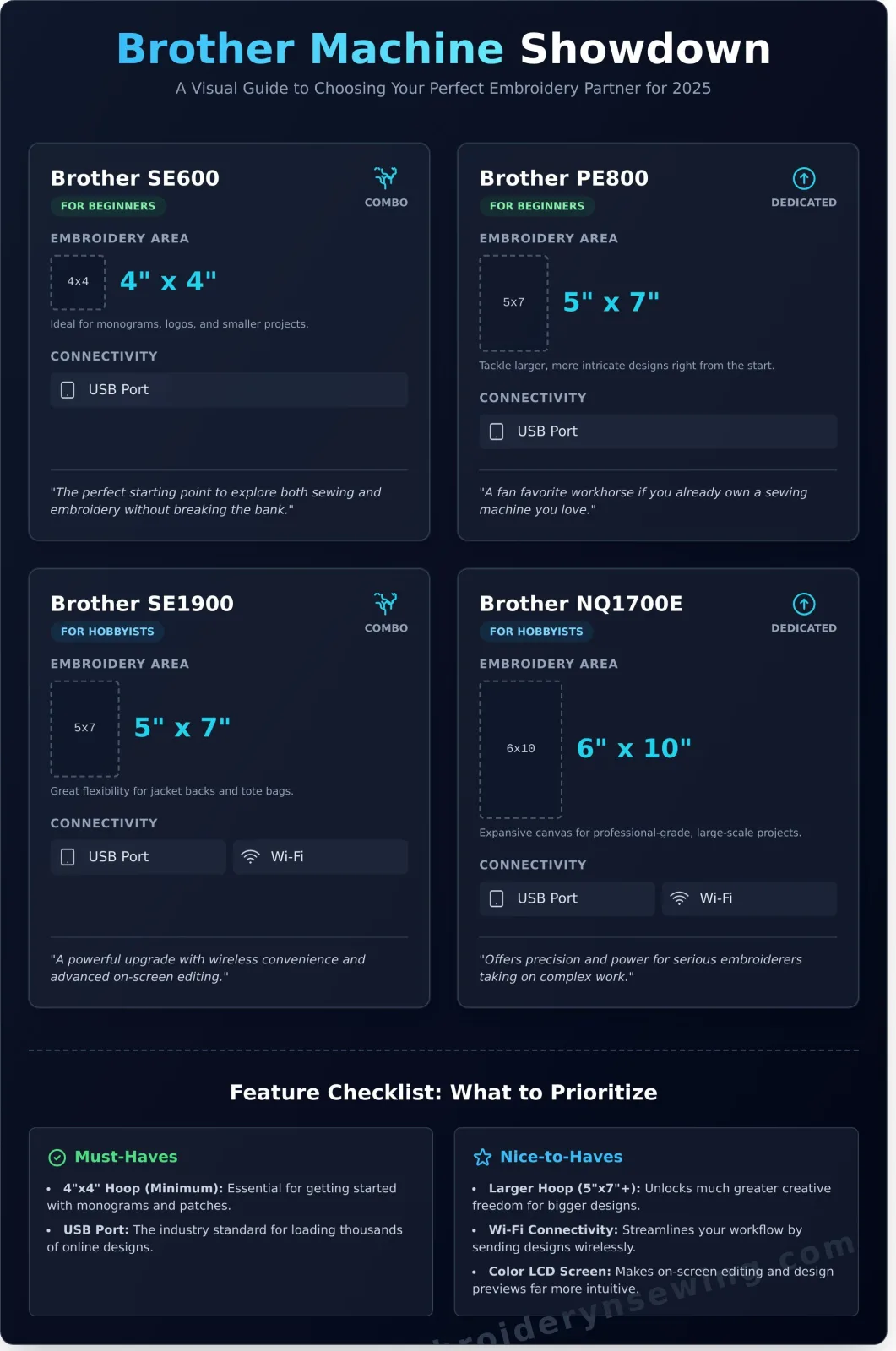
Think of the hoop size as your canvas. It defines the maximum single area you can stitch in one go. A 4"x4" hoop is perfect for monograms on towels and logos on polo shirts. A larger 5"x7" hoop opens the door to more intricate designs on jacket backs and tote bags. While you can create bigger designs with a technique called multi-hooping, starting with a larger hoop provides much more flexibility for future projects.
Connectivity: Getting Designs on Your Machine
How do you get designs from your computer to the machine? The standard method is a USB port, just like using a flash drive to move a file. It’s simple and reliable. Newer models, however, offer Wi-Fi connectivity. This allows you to send designs wirelessly from your computer or even your phone using Brother's Artspira app, streamlining your workflow significantly.
Built-in Designs vs. Your Own Digital Files
Most machines come with a library of built-in designs and fonts. These are fantastic for getting started right away. However, the real magic happens when you use your own digital files. You can purchase millions of professional designs online from marketplaces like Etsy or even create your own, giving you limitless creative freedom that the built-in library can't match.
Embroidery-Only vs. Combination Machines
An embroidery-only machine (like the PE800) is a dedicated workhorse. If you already own a sewing machine you love, this is an excellent choice. A combination sewing and embroidery machine (like the SE1900) is a versatile, space-saving option for those who do both. The evolution of these combo units is a testament to the incredible history of the sewing machine, transforming a simple mechanical tool into a computerized creative powerhouse.
Feature Checklist: Must-Haves vs. Nice-to-Haves
- Must-Haves:
- A hoop size that fits your primary goals (4"x4" minimum).
- USB port for easy design transfer.
- Nice-to-Haves:
- A larger 5"x7" (or bigger) hoop for flexibility.
- Wi-Fi connectivity for wireless convenience.
- A color LCD touchscreen for on-screen editing.
Top Brother Embroidery Machine Models for Every Crafter
Choosing the right Brother embroidery machine can feel overwhelming, but the key is matching the features to your creative goals. We've curated a list of the most popular and reliable models, breaking them down by user level to help you find the perfect fit, whether you're just starting out or launching a business.
Best for Beginners: The Brother PE800 & SE600
For those new to machine embroidery, ease of use and affordability are paramount. Brother's entry-level models excel here, offering intuitive interfaces and a gentle learning curve without sacrificing quality.
- Brother PE800: This embroidery-only machine is a fan favorite. Its generous 5"x7" hoop area lets you tackle larger designs from the start, and the full-color LCD touchscreen makes editing and previewing designs simple. It's the perfect choice if you already own a separate sewing machine.
- Brother SE600: A versatile sewing and embroidery combination machine, the SE600 is an incredible value. It features a 4"x4" embroidery area, which is ideal for personalizing clothing, towels, and small projects. If you want to explore both worlds without buying two machines, this is your starting point.
Best for Hobbyists: The Brother SE1900 & NQ1700E
Ready to move beyond the basics? These models offer larger embroidery areas and more advanced features for crafters who want to expand their creative horizons. It's no surprise that models in this class are frequently highlighted in roundups like Good Housekeeping's top embroidery machines for their blend of power and user-friendly features.
- Brother SE1900: This popular combo machine is a true workhorse. It boasts a 5"x7" embroidery hoop, hundreds of built-in sewing stitches, and powerful on-screen editing capabilities. You can combine designs, change colors, and add lettering right on the machine, giving you immense creative control.
- Brother NQ1700E: If your passion is purely embroidery, the NQ1700E is a significant step up. This dedicated embroidery machine features a large 6"x10" hoop, perfect for jacket backs, pillows, and large-scale art. It also offers faster stitching speeds and advanced editing functions.
Best for Small Business: The Entrepreneur Series
When your hobby turns into a business, efficiency is everything. The Brother Entrepreneur (PR) series is designed for commercial use. These multi-needle machines, like the PR680W or PR1055X, can stitch complex, multi-color designs without needing you to manually change the thread for each color. This single feature dramatically increases production speed. They also offer robust construction and the ability to embroider on challenging items like hats and bags, making them the ultimate high-volume brother embroidery machine for serious entrepreneurs.
You Bought a Machine! What Happens Next?
Congratulations on your new Brother embroidery machine! Unboxing it is an exciting first step, but the real creative journey starts now. Think of your machine as a high-tech paintbrush; it's a powerful tool, but you provide the canvas and the colors. This simple checklist will guide you through gathering your initial supplies and starting your very first project with confidence.
Essential Supplies: Thread, Stabilizer, and Needles
Before you can stitch anything, you’ll need a few core materials. Embroidery thread is specially designed to run smoothly at high speeds and has a beautiful sheen that makes designs pop. Stabilizer is a non-negotiable foundation that you place behind your fabric; it prevents puckering and ensures your stitches are crisp and clean. Finally, always use a fresh embroidery needle designed for the fabric you're using. A sharp needle is key to flawless results.
Your First Shopping List:
- A starter set of 40-weight embroidery thread (polyester or rayon)
- Cut-away stabilizer (for stretchy fabrics like t-shirts)
- Tear-away stabilizer (for stable fabrics like cotton or denim)
- A pack of size 75/11 embroidery needles
- Small, sharp scissors for trimming threads
The World of Digital Embroidery Designs (.PES Files)
The designs built into your machine are perfect for learning, but you are not limited to them. The true magic happens when you start exploring digital embroidery designs. These are files you can purchase and download from countless online artists and marketplaces. For any Brother embroidery machine, you will need files in the .PES format. Simply load the file onto a USB stick, insert it into your machine, and you have a new piece of art ready to go. The possibilities are endless, from intricate floral patterns to custom monograms.
Ready for amazing patterns? Browse our collection of embroidery designs.
Practice Makes Perfect: Your First Project
The best way to learn is by doing! Grab a piece of scrap fabric-something simple like cotton or a spare tea towel-and try a pre-installed design. This low-pressure exercise helps you understand the workflow without worrying about ruining a favorite garment. The process is straightforward: first, secure your fabric and a piece of stabilizer in the hoop. Next, select a simple design from your machine’s menu. Finally, thread your first color, press the start button, and watch your machine bring the design to life. This first stitch-out will build the confidence you need to tackle any project you can dream of.
Stitching It All Together: Your Perfect Brother Machine Awaits
Choosing the right embroidery machine is the first exciting step in a vibrant creative journey. As we've explored, Brother stands out for its user-friendly design and innovative features tailored for every skill level. By understanding the essentials-from hoop sizes to built-in designs-you are now fully equipped to select the perfect brother embroidery machine that will bring your artistic visions to life for years to come.
Now that you're ready to invest, the real fun begins: your first project! Don't let that brand-new machine sit idle. Find the perfect pattern for your new machine in our design shop! We have thousands of high-quality digital designs waiting for you, with instant downloads in all major formats, including .PES. Whether you love sports, cartoons, or festive holiday themes, your next masterpiece is just a click away.
Happy stitching, and we can't wait to see what you create!
Frequently Asked Questions About Brother Embroidery Machines
Can I use any embroidery design file with a Brother machine?
Brother machines primarily use their native .PES file format. While many models are also compatible with other common formats like .DST, you cannot use just any file. It is essential to check your specific model's instruction manual for a complete list of supported file types. If you have a design in an unsupported format, you will need to use embroidery software to convert it to a compatible one before transferring it to your machine via USB stick.
What is the difference between a Brother SE and PE model?
The letters indicate the machine's primary function. "SE" models are combination Sewing and Embroidery machines, like the popular Brother SE600. They are versatile and can handle both regular sewing tasks and embroidery projects. "PE" models, such as the PE800, are dedicated Embroidery-only machines. These typically offer larger embroidery fields and more advanced features focused solely on embroidery, making them ideal for users who already own a separate sewing machine and want a specialized tool.
How much does a good Brother embroidery machine cost?
The price for a good Brother embroidery machine can range significantly. Entry-level models perfect for beginners, like the PE535, typically cost between $400 and $700. Mid-range machines with larger hoops, color screens, and more built-in designs usually fall between $1,000 and $3,000. For small businesses or serious hobbyists, advanced multi-needle machines can cost anywhere from $5,000 to over $10,000, offering professional speed and capabilities for complex projects.
Is it difficult to learn how to use a Brother embroidery machine?
No, Brother machines are widely considered user-friendly and great for beginners. Most models feature intuitive LCD touchscreens, on-screen setup guides, and helpful automated functions like automatic needle threaders. The learning curve is quite manageable for most users. Furthermore, there is a vast amount of free learning resources available online, including video tutorials and active social media communities, to help you master your machine and troubleshoot any issues you might encounter.
What software do I need to use with my Brother machine?
You do not need any additional software to use the designs built into your machine or to use purchased design files that are already in a compatible format. However, if you want to create your own designs from scratch, edit existing designs, or convert artwork into stitch files (a process called digitizing), you will need embroidery software. Brother offers its own suite called PE-DESIGN, but many users also use popular third-party options like Embrilliance or Hatch.
How often do I need to service my embroidery machine?
Regular self-maintenance is crucial. You should clean the bobbin case of lint after every 10-15 hours of use and follow the oiling schedule in your manual. For professional servicing, it's recommended to take your machine to an authorized dealer every one to two years, depending on your usage. If you use your machine heavily for a home business, an annual professional tune-up is a wise investment to keep it running smoothly and prevent costly repairs.