

# How to Choose the Right Machine Embroidery Designs
Have you ever spent hours prepping a beautiful piece of linen only to have your machine chew through the fabric because the design was too dense? It's a common frustration that can stall your creativity before you even get started. You deserve to feel confident that every file you purchase will stitch out perfectly on your specific equipment. You are likely wondering, "How do I choose the right machine embroidery design for my needs?" to avoid wasting time and materials.
We're here to help you navigate our massive library of options, from NFL embroidery designs and anime motifs to intricate car logo embroidery designs, with total ease. This article teaches you how to match digital designs to your machine's hoop size and fabric weight for flawless results. We will cover technical compatibility and design selection to ensure your next project starts with a successful, instant download.
-
Ensure seamless project starts by matching your machine's specific file format, such as .PES or .EXP, with the correct hoop size for your digital design.
-
Protect your garments from puckering by choosing the ideal stitch density for your fabric weight, ensuring high-quality results on every stitch-out.
-
Stop wondering, "How do I choose the right machine embroidery design for my needs?" as you explore an abundance of niche categories from sports logos to cartoon motifs.
-
Unlock instant project inspiration by learning how to navigate professional categories to find exactly the theme you need for your next custom creation.
Table of Contents
Mastering Technical Compatibility: Formats and Hoop Sizes
Success starts with technical precision. You might wonder, "How do I choose the right machine embroidery design for my needs?" before hitting the download button. The secret lies in matching the file to your machine's internal software. Every machine operates on a specific "language" or file format. Without the right one, your machine can't read the data. For a helpful Machine embroidery overview, you can explore how these digital files translate into physical stitches.
Choosing the Correct File Format
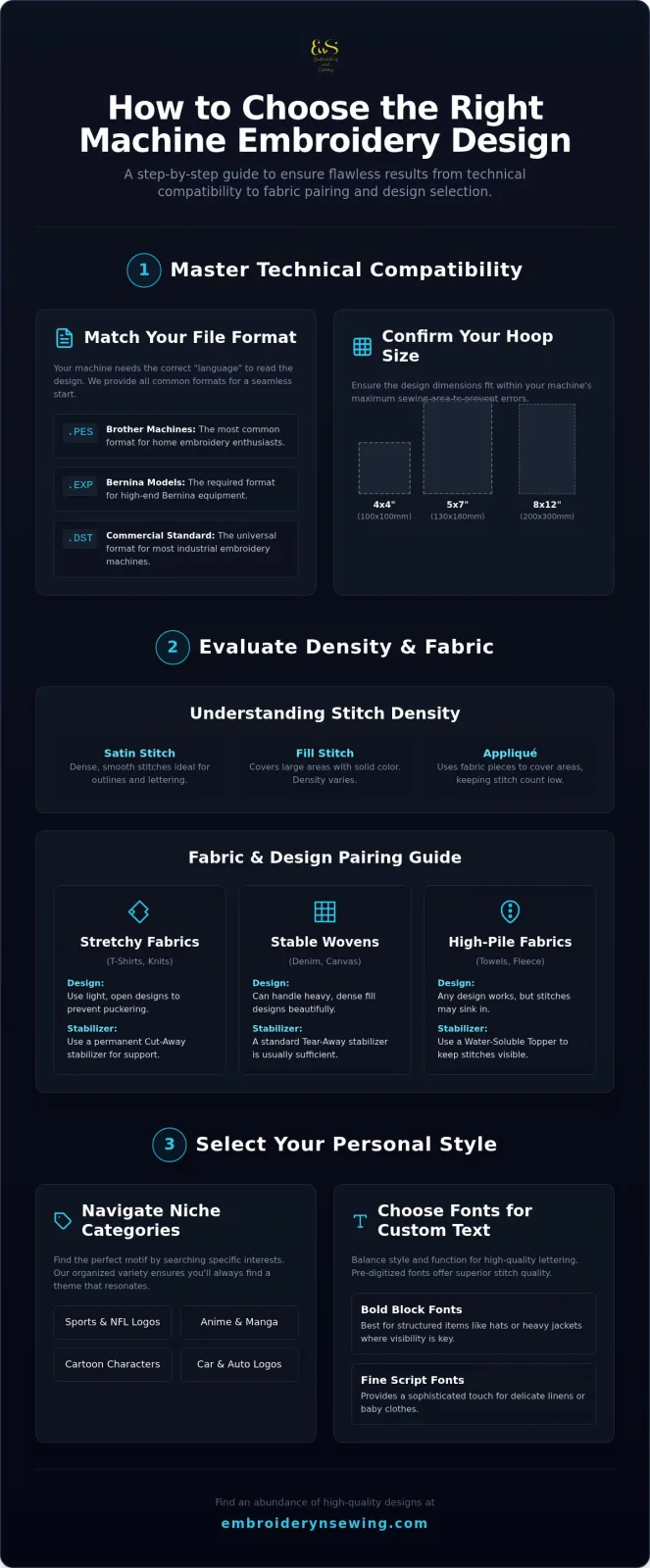
An embroidery format consists of the digital instructions that tell your machine where to place every stitch. Home users often require .PES for Brother machines or .EXP for Bernina models. If you operate commercial equipment, .DST is the standard universal format. We provide an abundance of options in these formats, making it easy to find machine embroidery designs that suit your specific setup and software requirements.
Hoop Size and Design Dimensions
Your machine's maximum sewing area determines which files you can use. Always check the design's dimensions to avoid "out of bounds" errors that stop your project mid-stitch. Many of our popular themes, like NFL embroidery designs, are available in multiple sizes to fit 4x4, 5x7, or 8x12 hoops. To ensure a perfect fit, remember that 200mm is approximately equal to 7.8 inches. Use our Hoop Sizing Guide: Convert MM to Inches Easily to ensure your chosen design fits your hardware perfectly.
Evaluating Stitch Density and Fabric Requirements
Choosing a design involves more than just picking a pretty picture. You must ask, "How do I choose the right machine embroidery design for my needs?" specifically in relation to the fabric you've chosen. If the stitch density is too high for a thin fabric, you'll end up with puckering or even holes. Conversely, a light design might get lost on a heavy towel or thick canvas. Matching the weight of your thread work to the stability of your material is the best way to ensure a professional finish.
### Understanding Stitch Density
Stitch density refers to how closely the individual threads are packed together, directly impacting how much the fabric will pull or distort during the sewing process. Satin stitches are ideal for smooth monograms or crisp outlines; meanwhile, fill stitches cover larger interior areas with solid color. If you're working on a large project but want to keep the fabric soft, consider appliqué. It lets you cover a wide area using fabric pieces instead of thousands of stitches. You can browse our collection of high quality embroidery designs to see examples of these different styles in action.
Success depends on the right combination of design, fabric, and stabilizer. Use this quick checklist for your next project:
-
Stretchy Fabrics: Use light, open designs with a cut-away stabilizer to prevent shifting.
-
Stable Wovens: Feel free to use heavy fill designs with a standard tear-away stabilizer.
-
High-Pile Fabrics: Use a water-soluble topper to keep stitches from sinking into the nap.
To better understand these textures and how they appear once stitched, check out our guide on Embroidery Stitches: A Visual Guide for Machine Embroidery.
![How do I choose the right machine embroidery design for my needs?]
## Selecting Designs for Personalization and Style
Once you've mastered formats and fabric weights, the fun part begins: choosing a style that sparks joy. You might ask, "How do I choose the right machine embroidery design for my needs?" when faced with thousands of creative possibilities. Success comes down to matching the design's theme to the person who will wear or use the finished product. Whether you're creating a gift or a custom item for your own collection, the design should reflect a specific personality.
Navigating Niche Design Categories
Finding the perfect motif is simple when you search by specific interest. We offer an abundance of digital embroidery designs that cover everything from high-action anime scenes to classic cartoon characters. If you're prepping for game day, using NFL stadium-themed designs or college athletics motifs allows you to create professional-grade fan gear in minutes. This organized variety ensures you'll always find a theme that resonates with your creative vision.
### Choosing Fonts for Custom Text
Personalization often requires high-quality lettering. Selecting the right font is a balance between style and function. Bold block fonts work best for structured items like hats or heavy jackets where visibility is key. For delicate linens or baby clothes, a fine script font provides a sophisticated touch. We recommend using pre-digitized font sets because they offer superior stitch quality compared to the basic generators found in standard software.
Instant downloads mean you can start stitching as soon as inspiration strikes. Whether you prefer a vintage aesthetic or a sleek modern look, our categorized marketplace helps you find exactly what you need. This structured approach helps you move from browsing to stitching without the stress of manual digitizing.
Ready to Start Your Next Embroidery Project?
You've mastered the technical side of file formats and learned how to match stitch density to your favorite fabrics. By following these simple steps, you ensure that every project results in a high-quality stitch-out without the frustration of puckered material or hoop errors. Stop asking, "How do I choose the right machine embroidery design for my needs?" and start creating with total confidence.
Our marketplace offers a cost-effective alternative to custom digitizing with high-quality designs across hundreds of niche categories. Whether you're looking for sports motifs or elegant monograms, our instant downloads allow you to begin your work immediately. Browse our massive collection of digital embroidery designs and start your project today! We're excited to see the beautiful, personalized pieces you create with your machine.
Frequently Asked Questions
Can I resize a digital embroidery design after I buy it?
You can typically resize a design by 10% to 20% using your machine's built-in settings or basic software. However, resizing beyond this range often compromises stitch quality because the density doesn't automatically recalculate. We recommend purchasing the specific size required for your hoop to ensure the most professional and reliable results for your project.
What happens if I download the wrong file format for my machine?
If you download an incompatible format, your machine won't display the file or allow you to select it for stitching. We understand how frustrating technical barriers can be, so we include multiple industry-standard formats with our digital embroidery designs. Simply return to your download link to grab the .PES, .DST, or .EXP file that matches your equipment.
How do I know if a design is too dense for my fabric?
High stitch counts in small areas indicate heavy density, which can cause thin fabrics to pucker or tear. When you ask, "How do I choose the right machine embroidery design for my needs?" for delicate items, look for designs with open spaces or light fill. Testing a design on a scrap piece of your intended fabric is the best way to verify compatibility.
Where can I find high-quality sports and university embroidery designs?
Our marketplace offers an abundance of specialized themes, including high-demand NFL embroidery designs and university embroidery designs. We've organized these into clear categories so you can find exactly what you need for game-day apparel or custom gifts. These professional files provide a cost-effective alternative to custom digitizing while maintaining the high-quality standards your projects deserve.


